In the world of mobile repairs, flashing firmware and performing system repairs are essential tasks. The Best Flash Tool by BossV V1.7 (BFT) is a versatile and powerful software designed for flashing, repairing, and unlocking various smartphone brands and chipsets. Whether you’re performing IMEI repair, FRP bypass, or upgrading firmware, the BFT Tool offers everything you need in a single tool.
Table of Contents
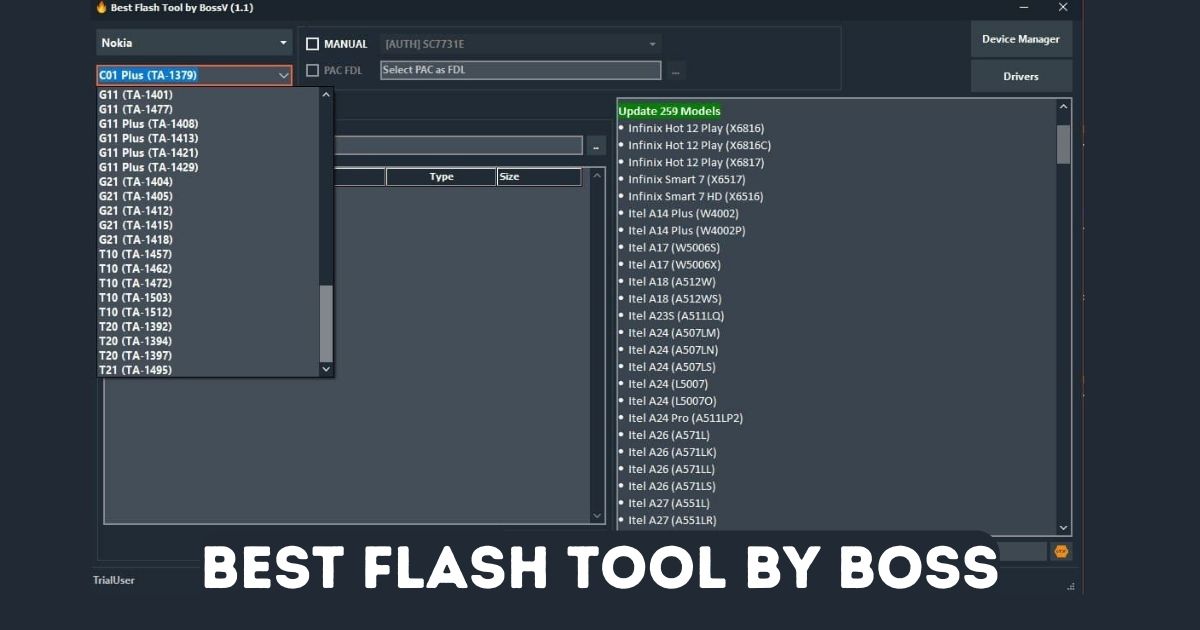
Why Choose Best Flash Tool by BossV?
If you’re looking for the Best Flash Tool by BossV to carry out mobile flashing and repairs, here are the reasons why BFT is the right choice:
User-Friendly Interface
The BFT Tool features a user-friendly interface that makes it easy for technicians, even beginners, to perform flashing and repair tasks quickly and efficiently. The tool is designed with simplicity in mind, making flashing firmware, resetting FRP, or repairing IMEI numbers straightforward.
Flashing Options and Chipset Support
The Best Flash Tool by BossV 1.6 supports multiple chipsets including Qualcomm, MediaTek (MTK), Unisoc, and Samsung Exynos, making it a versatile tool for all types of smartphones. From Qualcomm Snapdragon flashing to MTK firmware flashing, the tool provides comprehensive support for various chipsets, ensuring a smooth process.
Security and Repair Functions
The tool also provides a variety of security and repair functions, including IMEI repair, FRP reset, and bootloader unlock. It supports bypassing security locks such as Mi Cloud, Huawei ID, and more, making it an essential tool for professionals handling different mobile repairs.
Supported Chipsets and Models
The Best Flash Tool by BossV supports a wide range of devices, ensuring you can repair and flash a variety of smartphones. Whether you’re working with Qualcomm, MTK, Unisoc, or Samsung chipsets, BFT has you covered.
Griffin Unlocker : Download and Install (Latest)
Supported Models
The Best Flash Tool by BossV supports an extensive list of models from various smartphone manufacturers. Below is a detailed table of supported models, ensuring technicians can easily identify which devices can be serviced with the tool.
Vivo Models
| Model Name | Chipset |
|---|---|
| Vivo S1 | MT6761 |
| Vivo V21 5G | MT6762 |
| Vivo X60 Pro | MT6765 |
| Vivo V17 Pro | MT6875 |
| Vivo Y20 | MT6833 |
| Vivo Y50 | MT6885 |
| Vivo V15 | MT6768 |
| Vivo X70 5G | MT6891 |
| Vivo X60t | MT6893 |
Oppo Models
| Model Name | Chipset |
|---|---|
| Oppo A11 | MT6877 |
| Oppo F17 Pro | MT6771 |
| Oppo Reno6 5G | MT6875 |
| Oppo Reno10 | MT6875 |
| Oppo F25 Pro | MT6883 |
| Oppo A5 2020 | MT6765 |
Realme Models
| Model Name | Chipset |
|---|---|
| Realme Narzo 50A | MT6765 |
| Realme C11 | MT6833 |
| Realme C12 | MT6765 |
| Realme Narzo 20 | MT6771 |
| Realme X2 | MT6875 |
| Realme X50 Pro | MT6883 |
Xiaomi Models
| Model Name | Chipset |
|---|---|
| Xiaomi Redmi Note 13 5G | Qualcomm Snapdragon |
| Xiaomi POCO X6 Neo 5G | Qualcomm Snapdragon |
| Xiaomi Redmi A3 | Qualcomm Snapdragon |
| Xiaomi Redmi Note 10 | Qualcomm Snapdragon |
Samsung Models
| Model Name | Chipset |
|---|---|
| Samsung Galaxy A12 | Exynos |
| Samsung Galaxy A32 | Exynos |
| Samsung Galaxy S21 | Qualcomm/Exynos |
| Samsung Galaxy A52 | Exynos |
| Samsung Galaxy A72 | Exynos |
| Samsung Galaxy M11 | Exynos |
Huawei Models
| Model Name | Chipset |
|---|---|
| Huawei Honor 8A Prime | Kirin |
| Huawei Honor Play 8A | Kirin |
| Huawei Honor 90 Pro | Kirin |
| Huawei Honor X6 | Kirin |
| Huawei Honor X7 | Kirin |
Infinix Models
| Model Name | Chipset |
|---|---|
| Infinix Hot 12 Play | MediaTek |
| Infinix Smart 7 | MediaTek |
| Infinix Note 10 | MediaTek |
iTel Models
| Model Name | Chipset |
|---|---|
| iTel A14 Plus | Spreadtrum |
| iTel Vision 3 | Spreadtrum |
| iTel Vision 5 | Spreadtrum |
| iTel A49 Play | Spreadtrum |
Motorola Models
| Model Name | Chipset |
|---|---|
| Motorola E20 | MediaTek/Qualcomm |
| Motorola E7i Power | MediaTek/Qualcomm |
Nokia Models
| Model Name | Chipset |
|---|---|
| Nokia C01 Plus | MediaTek |
| Nokia G21 | MediaTek |
| Nokia X20 | Qualcomm |
Tecno Models
| Model Name | Chipset |
|---|---|
| Tecno Pop 5 | MediaTek |
| Tecno Pop 5 Go | MediaTek |
| Tecno Spark 7 | MediaTek |
Wiko Models
| Model Name | Chipset |
|---|---|
| Wiko Y82 | MediaTek |
| Wiko Y80 | MediaTek |
ZTE Models
| Model Name | Chipset |
|---|---|
| ZTE Blade A3 2020 | Qualcomm |
| ZTE Blade A7s 2020 | Qualcomm |
| ZTE Blade A5 Pro | Qualcomm |
Android Tool by Seharh V1.5 – Unlock, FRP, Fix, and More
How to Use Best Flash Tool by BossV
Using the Best Flash Tool by BossV 1.6 is simple. Here’s how to get started:
Step 1: Download and Install the Tool
- Download the latest version of Best Flash Tool by BossV from the official website.
- Extract the downloaded file and run the EXE file to install it.
Step 2: Launch the Tool
- After installation, double-click the BFT icon on your desktop to open it.
Step 3: Login
- Use the credentials (TrialUser / fj6Y732M7j4c703N) to log in and start using the tool.
Step 4: Select Your Device
- Choose your device from the supported list or search for it.
Step 5: Choose the Operation
- Select the operation you want to perform, such as flashing firmware, IMEI repair, or FRP reset.
Step 6: Start the Process
- Click Start to begin the flashing or repair process. Wait for the operation to complete.
Step 7: Completion
- Once the task is complete, the tool will notify you. Disconnect the device and reboot it.
Phone FRP Tool Free Download 2025: Easy FRP Bypass Method
Download Best Flash Tool by BossV 1.7
To Download the latest version of Best Flash Tool by BossV :
| Info | software Details |
|---|---|
| Tool Name | Best Flash Tool |
| Tool Version | V1.7 |
| release date | 15th July 2025 |
| Price | Free |
| Supported | Windows |
| Host | Other |
| Password | 123 |
Newly Supported Devices
Huawei
- Honor 8X Max (ARE-AL10D)
- Honor Magic4 Lite (ANY-L21CQ)
- Honor X30 (ANY-AN00)
- Honor X9 (ANY-N21)
- Nova 10 SE (BNE-AL00)
- Nova 9 (NAM-LX9)
- P50 (ABR-AL00)
- X40 GT (ADT-AN00)
Samsung
- Galaxy A05s (SM-A057G) — Bit-6
- Galaxy A52 (SM-A525F) — Bit-B
- Galaxy A52 5G (SM-A526U) — Bit-H
- Galaxy A52s 5G (SM-A528B) — Bit-B
- Galaxy A70 (SM-A7050) — Bit-5
- Galaxy A72 (SM-A725M) — Bit-A
- Galaxy M44 5G (SM-M446K) — Bit-5
- Galaxy S10 (SCV41) — Bit-1
- Galaxy S21 FE 5G (SM-G990U) — Bit-F
- Galaxy S21+ 5G (SM-G9960) — Bit-B
- Galaxy S22 Ultra 5G (SM-S908U) — Bit-8
- Galaxy S23 (SM-S9110) — Bit-5
- Galaxy S23 5G (SM-S9110) — Bit-6
- Galaxy S23 Ultra (SM-S9180) — Bit-6
- Galaxy S23+ (SM-S916U) — Bit-6
- Galaxy S24+ (SM-S9260) — Bit-4
- Galaxy Tab A9+ (SM-X216C) — Bit-6
- Galaxy Tab A9+ 5G (SM-X218B) — Bit-6
- Galaxy Tab Active Pro (SM-T545) — Bit-4
- Galaxy Tab S5e (SM-T725) — Bit-3
- Galaxy Tab S9 Ultra (SM-X9180) — Bit-5
- Galaxy XCover6 Pro (SM-G736U) — Bit-A
- Galaxy Z Flip3 5G (SM-F711U) — Bit-B
- Galaxy Z Fold3 5G (SCG11) — Bit-1
- Galaxy Z Fold3 5G (SM-F9260) — Bit-9
- Galaxy Z Fold5 (SM-F946U) — Bit-6
Xiaomi
- POCO C75 (lake)
- POCO M5 (rock)
- POCO X6 Pro (duchamp)
- Redmi 14C (lake)
- Redmi A3 Pro (lake)
- Redmi K70E (duchamp)
To Download the Old version of Best Flash Tool by BossV :
| Info | software Details |
|---|---|
| Tool Name | Best Flash Tool |
| Tool Version | V1.6 |
| release date | 06th June 2025 |
| Price | Free |
| Supported | Windows |
| Host | Other |
Frequently Asked Questions (FAQ)
What is the Best Flash Tool by BossV?
The Best Flash Tool by BossV (BFT) is a mobile flashing and repair tool designed to help technicians perform tasks such as flashing firmware, IMEI repair, FRP bypass, and unlocking bootloaders.
How Do I Use the Best Flash Tool by BossV?
Download the tool, log in with your credentials, select your device, choose the operation, and click Start to begin the flashing or repair process.
Can I Use the Best Flash Tool for IMEI Repair?
Yes, Best Flash Tool by BossV allows you to repair IMEI numbers on devices that support Qualcomm or MediaTek chipsets.
Free Download VIP Pro Support Tool – Easy Android Fix
Conclusion
The Best Flash Tool by BossV 1.6 is a powerful tool for mobile technicians. It supports a wide range of devices, chipsets, and operations, from flashing firmware to IMEI repair and FRP bypass. Its easy-to-use interface, support for multiple chipsets, and frequent updates make it an essential tool for any technician in the mobile repair industry.