In today’s world, Android devices have become an essential part of our lives — from communication to entertainment and even work. With that growing importance comes the need for tools that can help manage, repair, and optimize these devices. This is where the VIP Pro Support Tool steps in as a powerful, reliable, and user-friendly solution for Android device servicing.
Whether you’re a professional technician or a curious Android enthusiast, this tool can be a game-changer. In this article, we’ll break down everything you need to know about the VIP Pro Support Tool — what it is, how it works, its features, benefits, and how you can use it to take control of your Android device like a pro.
Table of Contents
What is the VIP Pro Support Tool?
The VIP Pro Support Tool is a free Android utility tool developed to assist with mobile servicing operations such as ADB (Android Debug Bridge) and Fastboot tasks. Think of it as a digital toolbox for your Android device — equipped to fix common issues, manage settings, unlock functionalities, and perform tasks that would otherwise require more complex software.
The tool is available at Officialroms.com, a trusted platform offering various Android servicing solutions to mobile repair technicians and enthusiasts alike.
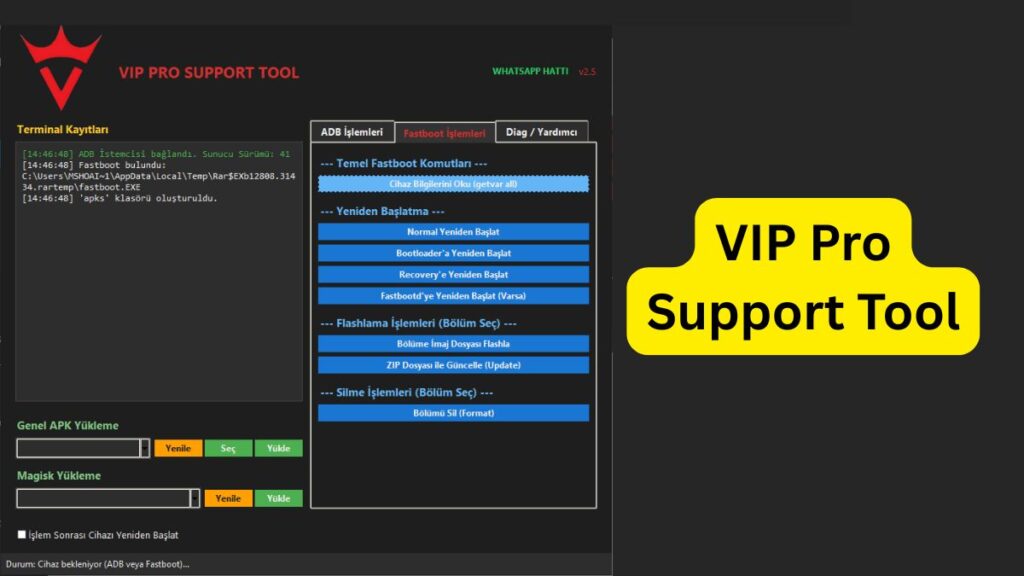
Key Functions of VIP Pro Support Tool
Here are the core functionalities that make the VIP Pro Support Tool stand out:
1. ADB Operations
ADB allows you to communicate with your Android device via command-line. The VIP Pro Support Tool simplifies this by providing one-click ADB commands such as:
- Viewing connected devices
- Rebooting into recovery or bootloader
- Installing or removing apps
- Accessing file systems
Example use-case: You can install an APK file directly on your phone using sideload mode — without even unlocking your screen.
2. Fastboot Functions
Fastboot is used for low-level operations like flashing firmware or unlocking bootloaders. The tool provides a convenient interface for:
- Unlocking/locking the bootloader
- Flashing recovery images
- Rebooting into various modes
Example use-case: If your device is stuck in bootloop, Fastboot can help you re-flash the stock firmware and bring it back to life.
3. Sideload Capabilities
The sideload function allows you to install apps or updates through ADB when traditional installation methods don’t work — especially useful when the phone’s screen is locked or broken.
Example use-case: You can sideload OTA updates or third-party apps during recovery mode.
4. Device Info Reader
With a single click, you can retrieve essential device information such as:
- IMEI number
- Model name
- Android version
- Bootloader status
- Battery status
This is extremely useful for diagnosing issues or preparing a phone for servicing.
Supported Android Device Brands and Models:
- Samsung (Galaxy S, Note, A, M series) — ADB mostly; limited Fastboot
- Xiaomi / Redmi / POCO — Full ADB & Fastboot support
- Realme / OPPO — ADB and some Fastboot functions
- Vivo / iQOO — ADB support; limited Fastboot
- OnePlus — Full ADB & Fastboot support
- Motorola / Lenovo — Full ADB & Fastboot support
- Google Pixel — Full ADB & Fastboot support
- Infinix / Tecno / Itel — Mostly ADB support
- Huawei / Honor — ADB supported; bootloader unlock limited
- Sony / LG / Asus / Nokia / Micromax / Lava — Mostly ADB & Fastboot supported
Why Use VIP Pro Support Tool?
There are plenty of mobile utility tools out there, but VIP Pro Support Tool offers some clear advantages:
Free to Use
Unlike many paid Android tools, VIP Pro Support Tool is 100% free and doesn’t require any subscription or premium access.
Lightweight & Portable
The software is lightweight and doesn’t slow down your computer. You can run it on any Windows PC without installation — just download, extract, and use.
User-Friendly Interface
Everything is accessible through a clean, minimal interface. Even if you don’t have a technical background, you’ll find it easy to navigate.
No Need for Coding Knowledge
Forget about typing confusing command lines. Just plug your device in and click the buttons for the operation you want.
System Requirements
To use VIP Pro Support Tool effectively, make sure your system meets these basic requirements:
- Windows 7/8/10/11 (32 or 64-bit)
- USB cable for device connection
- Android drivers (e.g., ADB/Fastboot drivers)
- .NET Framework 4.0 or above
Tip: Always keep USB debugging enabled on your Android device for seamless ADB connectivity.
Where to Download VIP Pro Support Tool?
To get the latest version (currently VIP Pro Support Tool V2.6) follow below details:
| File Name: | VIP Pro Support Tool V2.6 |
| Size: | 21.1 Mb |
| Password | 2025 |
| Support: | Telegram Channel |
How to Use VIP Pro Support Tool (Step-by-Step)
Here’s a simple step-by-step guide to get you started:
Step 1: Download the Tool
Go to Officialroms.com and download the latest version of VIP Pro Support Tool V2.6.
Step 2: Extract the Files
Use tools like WinRAR or 7-Zip to extract the downloaded ZIP file to a folder.
Step 3: Connect Your Device
Connect your Android phone via USB and make sure USB debugging is turned on.
Step 4: Launch the Tool
Open the VIP_Pro_Tool.exe file. The tool will automatically detect your device if ADB/Fastboot drivers are installed.
Step 5: Perform the Desired Operation
Choose the action you want to perform from the menu — whether it’s reading device info, sideloading an app, unlocking bootloader, etc.
That’s it! No technical jargon, no command lines, just simple clicks.
Is VIP Pro Support Tool Safe?
Yes, as long as you download it from the trusted website (Officialroms.com), the tool is safe and free from malware. However, always be cautious when performing actions like bootloader unlocks or firmware flashing — these can void your warranty or erase your data if not done properly.
Read also: Hammer Tool MediaTek: Flash & Unlock MTK Devices
Common Use Cases
Here are a few real-world examples of when you might use the VIP Pro Support Tool:
Unlocking Bootloader
Want to install a custom ROM or root your phone? Start by unlocking the bootloader using Fastboot via VIP Pro.
Recovering a Bricked Phone
If your phone is stuck in a boot loop or recovery mode, you can use Fastboot tools to flash the correct firmware and bring it back.
Sideloading Updates
Some Android updates are distributed in .zip files. With sideload, you can install them without waiting for OTA rollout.
Removing Bloatware
Use ADB to remove unwanted system apps and free up space — no root required.
Read also: MDM Fix Tool V1.0.8.1: Unlock Android Devices & Bypass MDM
Final Thoughts: Is It Worth It?
Absolutely. Whether you’re a professional mobile technician or just someone who enjoys learning about Android systems, the VIP Pro Support Tool is a powerful ally.
It’s:
- Free
- Simple to use
- Packed with essential features
In a world where most tools come with a price tag or steep learning curve, this tool stands out by putting powerful features at your fingertips — without the hassle.
Disclaimer: The VIP Pro Support Tool is intended for educational and professional servicing purposes only. Please proceed with caution when performing advanced operations such as firmware flashing, bootloader unlocking, or ADB commands. Improper use of this tool may void your device warranty or lead to data loss. The author and Officialroms.com are not responsible for any damage caused through misuse or incorrect application of the tool. Always back up your data and ensure you understand each function before proceeding.