If you’re a mobile technician, smartphone shop owner, or just a curious user who loves exploring phone software, the Artemis Unlock Tool v2025.06.04 is something you don’t want to miss. Developed by Knotthailand, this powerful unlocking solution helps you unlock, patch, and repair smartphone firmware—without the need for login or flashing tricks.
Table of Contents
What is Artemis Unlock Tool?
Artemis Unlock Tool v2025.06.04 is a portable software tool designed for unlocking and repairing smartphones—especially models from Realme, OPPO, and TCL. It uses smart automation and a simple interface to make device servicing easier, even for non-experts.
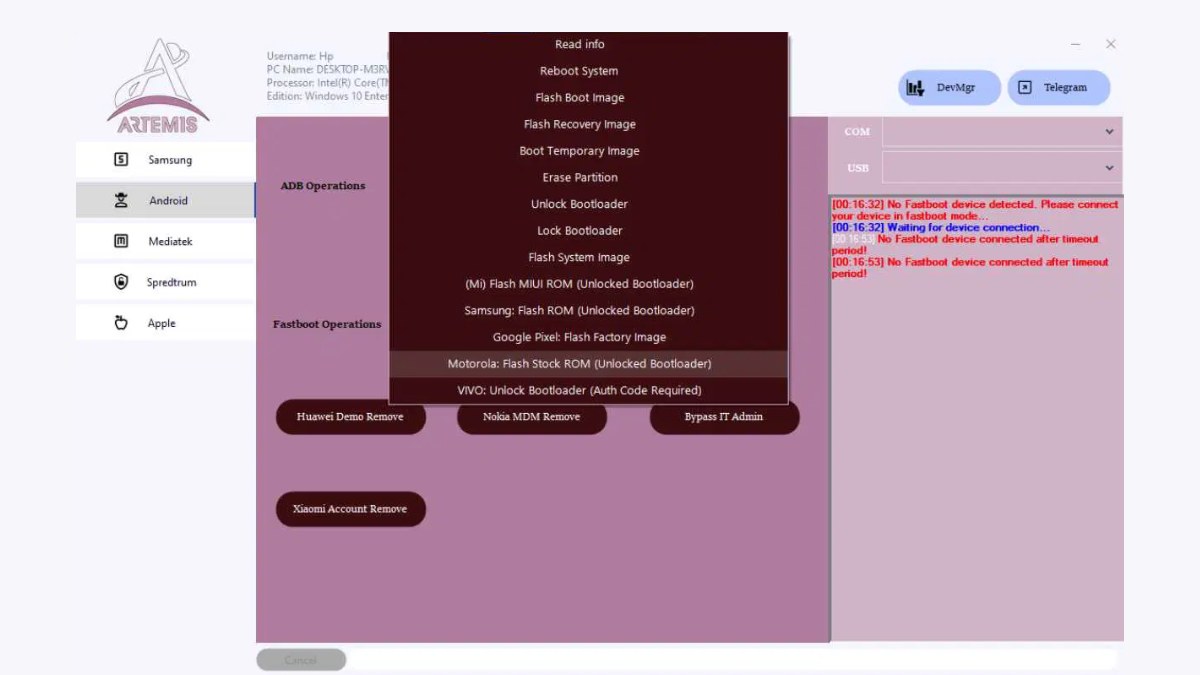
Key Features of Artemis Unlock Tool v2025.06.04
- No Login Required: Use the tool freely without creating any account.
- Supports Multiple Brands: Works with hundreds of Realme, OPPO, and TCL smartphones.
- AI-Powered Automation: Performs unlocks faster and smarter.
- Model-Specific Patching: Avoids unnecessary errors during operations.
- Portable Tool: No installation needed—just download and run.
Detailed Features of Artemis Unlock Tool v2025.06.04
Let’s dive deeper into the powerful features that make Artemis Unlock Tool v2025.06.04 a go-to choice for smartphone unlocking and firmware repair:
1. No Login Required – 100% Free Access
One of the most convenient features is that no login or registration is required to use the tool. You simply download the .rar file, extract it, and start using it right away.
No email, no activation key, no hidden subscription—just plug and play!
2. Supports Hundreds of Devices (Realme, OPPO, TCL)
The tool has wide compatibility with popular smartphone brands including:
- Realme: C55, 11x 5G, Narzo series, and more.
- OPPO: A-series, F-series, Reno models.
- TCL: Most Android-based models.
With each update, more models are added—ensuring your workbench is future-ready.
3. AI-Powered Automation
The Artemis tool uses AI-assisted routines to automatically detect the connected device and suggest the best unlocking or repair method.
- Reduces human error
- Speeds up the unlocking process
- Prevents bootloop or soft-brick conditions
Even if you’re a beginner, the tool’s smart automation guides you every step of the way.
4. Model-Specific Patching
Unlike generic unlockers, Artemis tailors its process based on the specific model and chipset (like Helio G88, Snapdragon, etc.).
- Prevents incompatibility issues
- Ensures safer and faster unlocking
- Reduces flashing failures
You’ll never face “device not supported” errors if your model is listed.
5. Portable Tool – No Installation Needed
This tool is fully portable, meaning:
- No need to install anything on your PC
- Works directly from the extracted folder
- Ideal for technicians who work from multiple PCs
Great for on-the-go repair professionals or mobile service centers.
6. Clean and User-Friendly Interface
The GUI (Graphical User Interface) is modern and easy to navigate:
- Clear icons and instructions
- No clutter or confusing menus
- Built-in logs to track actions
Whether you’re a pro or a DIY user, you’ll find the interface intuitive.
7. Safe Operations with Error-Free Results
Real-world usage examples have shown that Artemis can unlock devices in under 30 seconds without bootloader tricks or flashing errors.
- No relocking issues
- No loss of data (in most cases)
- No need to flash firmware manually
Tested and proven to work reliably in real-time conditions.
Supported Devices
This version supports a wide range of devices including:
- Realme C55 (Helio G88)
- Realme 11x 5G
- OPPO A-series
- TCL Android smartphones
(Full list available within the tool)
Read also: Hammer Tool MediaTek: Flash & Unlock MTK Devices
How to Use Artemis Unlock Tool
The best part? It’s beginner-friendly. Here’s a simple guide:
- Download the tool from the official website (link below).
- Extract the .rar file using WinRAR or 7-Zip.
- Run the tool—no installation required.
- Connect your smartphone via USB.
- Follow the on-screen instructions to unlock or repair the device.
Download Link
- File Name: ArtemisUnlock_04.06.2025.exe
- File Size: 155.3 MB
- Password: AM@04062025
Download Artemis Unlock Tool – v2025.06.04 (Mega server)
Once downloaded:
- Extract and launch.
- Begin unlocking like a pro.
Read also: Phone FRP Tool Free Download 2025: Easy FRP Bypass Method
Frequently Asked Questions (FAQ)
❓ Is Artemis Unlock Tool v2025.06.04 free?
Yes, the tool is free to use and doesn’t require any login or activation.
❓ Does it work without internet?
Yes. Since it’s a portable offline tool, it works without an active internet connection.
❓ Can I use this on any Android device?
It’s mainly built for Realme, OPPO, and TCL smartphones, but future versions may support more brands.
❓ Will unlocking erase my data?
In most cases, unlocking doesn’t erase your data, but it’s still recommended to back up your phone before use.
Read also: Griffin Unlocker V2025.06.05: Download and Install (Latest)
Final Thoughts
The Artemis Unlock Tool v2025.06.04 is a smart and effective choice for anyone needing a reliable network unlock tool with no login required. Whether you’re in the repair business or just a tech-savvy user, this tool can save you time and effort.
With its AI-powered features, simple usage, and broad support for Realme, OPPO, and TCL, it stands out as one of the best tools of 2025. Download it today and experience effortless smartphone unlocking!
Disclaimer: Always scan downloaded software before use. The author is not responsible for any issues that may occur.
Read also: Android Tool by Seharh V1.5 – Unlock, FRP, Fix, and More