If you’re searching for the best Android unlocking and servicing tool, look no further than AWT – AndroidWinTool. Packed with powerful features and offering a 30 Days Unlimited Access UnlockTool, this software is the ultimate solution for technicians and users who need to flash, unlock, or repair Android devices efficiently.
In this guide, we’ll explain why AWT is the best Android servicing software, how it compares to alternatives, and how to get started.
Table of Contents
What is AWT – AndroidWinTool?
AWT (AndroidWinTool) is a professional-grade Android servicing and unlocking software that helps users perform advanced tasks such as:
- FRP Bypass (Factory Reset Protection)
- Xiaomi MI Account Removal
- Screen Lock Removal (Pattern, PIN, Password)
- Bootloader Unlock
- Stock ROM/Custom Firmware Flashing
- Rooting and ADB/Fastboot Commands
Unlike other tools, AWT is a dongle-free solution, making it easy to install and operate on any Windows PC.
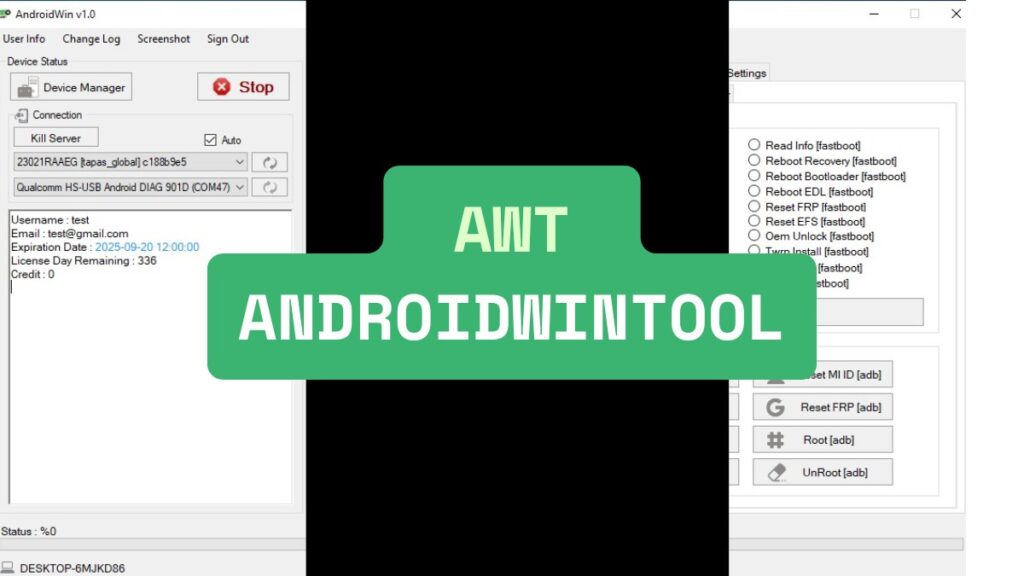
Key Features of AWT – AndroidWinTool
✅ 1. FRP Bypass Tool
AWT supports FRP unlock on a wide range of Android brands including:
- Samsung
- Xiaomi
- Vivo
- Oppo
- Realme
- Huawei
The software provides one-click solutions to bypass Google account verification screens.
✅ 2. MI Account Removal
Get rid of the locked MI Account on Redmi, Xiaomi, and POCO devices easily. AWT helps bypass the MI Cloud lock after a factory reset or software failure.
✅ 3. Screen Lock Removal
Forgot your screen lock password, PIN, or pattern? AWT removes screen locks without data loss in many supported models.
✅ 4. Bootloader Unlock
Unlock the bootloader on almost any Android smartphone. This enables root access, custom recovery installations, and full software customization.
✅ 5. Flashing and Firmware Management
Use AWT to flash stock firmware, custom ROMs, and recovery images. It’s a must-have tool for fixing boot loops, soft-bricked devices, and system errors.
✅ 6. ADB/Fastboot Toolkit
Advanced Android users can use built-in ADB and Fastboot commands to control devices via USB debugging or bootloader mode.
What is 30 Days Unlimited Access UnlockTool?
AWT offers a 30-day unlimited usage license that gives users full access to all features. This is perfect for:
- Mobile repair businesses
- Remote unlock service providers
- Freelance technicians
- DIY Android users with multiple devices
During the 30-day period, you can:
- Unlock unlimited devices
- Bypass FRP as many times as needed
- Use every tool inside the software without restrictions
How to Download AWT – AndroidWinTool?
To download and activate AWT:
- Purchase a license from an official vendor.
- Download the latest AWT setup for Windows. (MegaServer)
- Install and activate using your provided key.
- Start servicing your Android devices.
Make sure you always use the latest version to ensure maximum compatibility.
How to Use AWT – AndroidWinTool
Using AWT is simple even if you’re a beginner. Here’s a quick step-by-step guide:
Step 1: Download and Install
- Purchase or get a trial license from an authorized seller.
- Download the latest version of AWT from the official source.
- Install the software on your Windows PC (Windows 7/8/10/11 supported).
Step 2: Activate the Tool
- Launch AWT and enter the activation code provided.
- Connect your PC to the internet for license validation.
Step 3: Connect Your Android Device
- Enable USB Debugging on your phone (Settings > Developer Options).
- Use a good-quality USB cable to connect your phone to the PC.
Step 4: Choose Your Task
- From the AWT dashboard, select the task: FRP bypass, unlock, flash firmware, etc.
- Follow on-screen instructions. Most functions are one-click operations.
Step 5: Done!
Once the process completes, disconnect your phone and restart it.
Tip: Always take a backup before performing any action that may wipe your data.
Top 5 Alternatives to AWT – AndroidWinTool
If you’re comparing tools, here are five popular AWT competitors:
1. UnlockTool
- Supports 15+ brands
- Lifetime or monthly plans
- Excellent for remote unlocking
2. UMT (Ultimate Multi Tool)
- Strong Qualcomm support
- Reliable FRP, flash, and repair features
3. Octoplus FRP Tool
- Focused on Samsung and LG
- Supports advanced repair options
4. MRT Dongle
- Best for Vivo, Oppo, and Xiaomi
- Requires USB dongle
5. Hydra Tool
- Multi-brand support
- Great for flashing and repairs
While all are excellent, AWT stands out for being dongle-free, user-friendly, and regularly updated.
Frequently Asked Questions (FAQs)
Is AWT AndroidWinTool safe to use?
Yes, AWT is 100% safe when downloaded from official sources. It’s widely used by certified repair professionals.
Do I need a dongle or special hardware?
No. AWT is dongle-free. You only need a PC and internet connection for activation.
Can I unlock Samsung and Xiaomi devices?
Yes, AWT fully supports Samsung, Xiaomi, Vivo, Oppo, Realme, and other popular Android brands.
Is the 30-day access renewable?
Yes, you can renew your license after expiration. Monthly or longer-term plans may be available via resellers.
Can I use it on multiple PCs?
No. Licenses are machine-specific. You’ll need separate activations for each PC.
Is using AWT legal?
Using AWT on your own or authorized devices is legal. Unlocking stolen or blacklisted phones is illegal and unethical.
Final Thoughts – Why Choose AWT?
If you’re serious about Android repair, AWT – AndroidWinTool with 30 Days Unlimited Access UnlockTool is a smart investment. Its combination of FRP bypass, MI account removal, screen unlock, and flashing tools—without the need for a dongle—makes it one of the best Android servicing tools in 2025.
Disclaimer
AWT – AndroidWinTool is meant for legal and authorized use only. Using it on devices without permission may be illegal. We do not support or take responsibility for any misuse, data loss, or damage caused by the tool. Always follow local laws and use it responsibly.