When it comes to handling software issues on Xiaomi or Redmi devices powered by MediaTek (MTK) processors, the Xiaomi Mediatek V6 tool is one of the most trusted utilities among technicians and enthusiasts. Whether you’re dealing with bootloops, bricked phones, Mi account locks, or simply want to update your firmware manually, Xiaomi Mediatek V6 makes the process smooth and efficient.
In this article, we’ll cover everything you need to know about Xiaomi Mediatek, including features, benefits, download information, installation instructions, and frequently asked questions (FAQ).
Table of Contents
What is Xiaomi Mediatek V6 Tool?
Xiaomi Mediatek V6 is a specialized flashing tool designed to work specifically with Xiaomi and Redmi devices that have MediaTek processors. It allows users to:
- Flash Stock Firmware (ROMs)
- Remove Mi Account Lock (Bypass Mi Cloud)
- Unlock or Relock Bootloader
- Bypass Authentication (No authorized Xiaomi account needed)
- Format and Reset Devices
- Remove FRP (Factory Reset Protection) Lock
- Fix Bootloop and Software Corruption
Unlike standard flashing tools like SP Flash Tool, Xiaomi Mediatek V6 comes tailored for Xiaomi’s security layers and device structure, offering easier and faster operations.
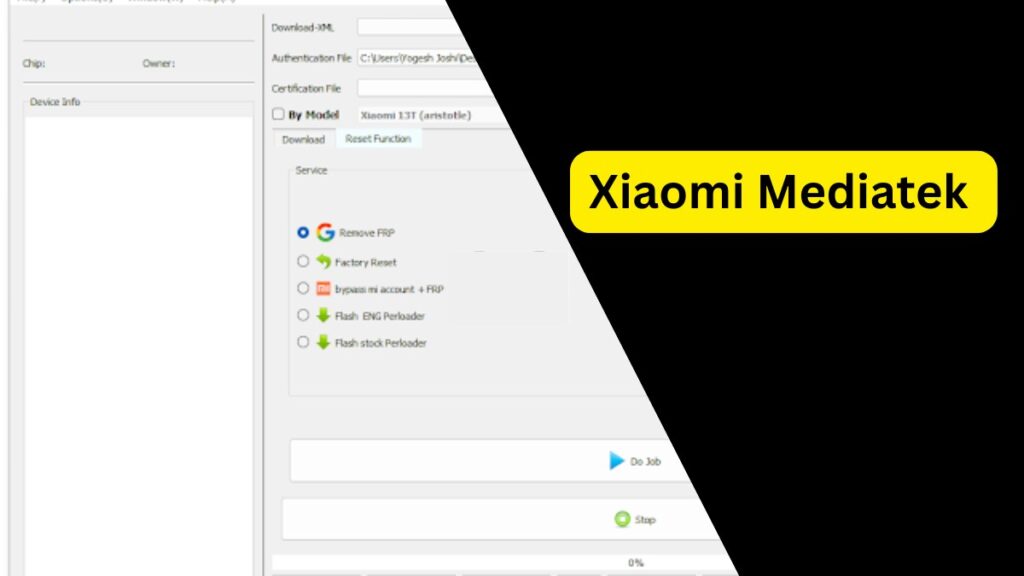
Key Features of Xiaomi Mediatek
- Bypass SLA/DA Authentication
Flash devices without needing authorized Xiaomi Mi accounts. - Flashing Stock ROMs
Install original firmware to fix software problems, upgrade or downgrade your system. - Mi Account Unlock
Remove Mi Cloud account verification if you’re locked out after a reset. - FRP Removal
Quickly erase Google Factory Reset Protection locks. - Device Formatting
Format devices completely (useful for deep cleaning or fixing corrupt systems). - Bootloader Operations
Support for unlocking and relocking bootloaders in certain cases. - One-Click Flash
Simplified interface for loading scatter files and flashing with minimal steps.
Supported Devices
Xiaomi Mediatek V6 supports most Xiaomi and Redmi models that come with MediaTek chipsets, including but not limited to:
- Redmi Note 8 Pro
- Redmi 10X 4G/5G
- Redmi 9 / 9A / 9C
- Redmi Note 9
- Poco M2
- Poco C3
- And many newer MediaTek-based Xiaomi models.
Note: Always check if your device is MediaTek-powered before proceeding.
Requirements
Before using the Xiaomi Mediatek V6 tool, ensure you have:
- A Windows PC (Windows 7/8/10/11)
- MediaTek USB Drivers installed
- A compatible Scatter File (comes with firmware)
- A USB Cable (preferably original)
- Fully charged device (or at least 50% battery)
Download Xiaomi Mediatek V6
| Name | Xiaomi Mediatek V6 |
| Size | 59MB |
How to Use Xiaomi Mediatek V6 Tool (Step-by-Step)
- Download and Install MTK Drivers
Install the latest MediaTek drivers on your Windows PC.
- Download the Xiaomi Mediatek V6 Tool
Extract the tool from the ZIP file to a folder on your PC.
- Open the Tool
Run the .exe file as Administrator.
- Load Scatter File
Click on Load Scatter and select the scatter file from your downloaded firmware.
- Prepare Your Phone
Power off your phone completely.
(Optional: Hold Volume Down or Volume Up while connecting.)
- Connect the Device
Use a USB cable to connect the device to the PC.
- Flash the Device
Click Start or Download and wait until the process completes.
- Done!
Disconnect your phone and boot it up.
Important Notes:
- Flashing will erase all your data — backup if possible.
- Using an incorrect ROM may brick your device.
- Unauthorized modification might void your warranty.
- Always use a trusted source to download the tool and firmware.
FAQs about Xiaomi Mediatek Tool
Is Xiaomi Mediatek V6 free to use?
Yes, it is completely free. However, make sure you download it from trusted sources to avoid malware.
What happens if I flash the wrong firmware?
Flashing incorrect firmware can brick your device, making it unbootable. Always double-check your phone’s exact model number and variant before flashing.
Does this tool require authentication?
No. One of the main advantages of Xiaomi Mediatek V6 is that it bypasses SLA/DA authentication, meaning you don’t need Xiaomi authorized accounts.
Can it unlock FRP lock?
Yes, Xiaomi Mediatek V6 can remove FRP lock (Google account verification) on most MediaTek devices.
Is it safe to use Xiaomi Mediatek V6?
If used correctly and downloaded from a trusted source, it is safe. Mishandling flashing operations, however, can lead to issues.
Does it support Qualcomm devices?
No. It is exclusively for MediaTek chipset Xiaomi devices. For Qualcomm-based devices, use tools like Mi Flash Tool.
Can I use it on MacOS or Linux?
No. Xiaomi Mediatek V6 only works on Windows operating systems.
My phone is not detected. What should I do?
Ensure MTK drivers are installed properly.
Try different USB ports or cables.
Use a different computer if possible.
Hold Volume Down or Volume Up button while connecting.
Final Thoughts
The Xiaomi Mediatek V6 tool is a game-changer for Xiaomi and Redmi device users with MediaTek chips. It makes flashing and device recovery tasks easier, quicker, and safer — all without the need for authorized Mi accounts. Whether you’re a professional technician or a DIY user, mastering this tool can save you from expensive repair costs and get your device running perfectly again.
Disclaimer
Flashing or modifying your device using the Xiaomi Mediatek V6 tool is at your own risk. We are not responsible for any damage, data loss, or warranty void resulting from its use. Always back up your data and proceed carefully.