In the ever-evolving world of Android customization and device management, users—especially technicians and power users—often require robust tools that can handle multiple tasks efficiently. Whether you’re aiming to bypass the setup wizard, perform a factory reset, unlock OEM features, or simply wipe an Android device clean, the AUT Tool emerges as a reliable, all-in-one solution.
In this article, we’ll explore everything you need to know about the AUT Tool latest version free download, its features, functionality, and how it empowers users to take full control over Android devices—safely, quickly, and effectively.
Table of Contents
What is AUT Tool?
AUT Tool (Android Utility Tool) is a powerful multi-utility software designed for Android smartphones and tablets. It combines essential functionalities like fastboot operations, ADB commands, OEM unlock, diagnostics, and app management into one user-friendly interface.
Whether you’re a professional smartphone technician or an Android enthusiast, AUT Tool helps you complete various complex tasks in just a few clicks—no command-line skills required.
Key Features of AUT Tool (Latest Version)
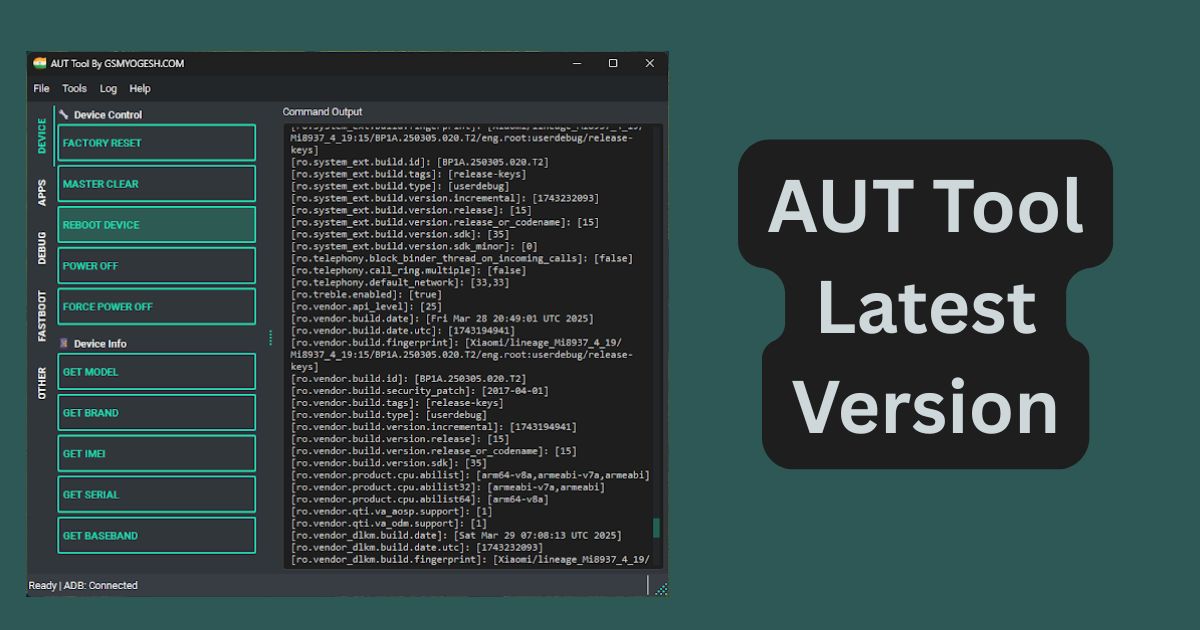
The latest version of the AUT Tool provides a rich set of functionalities that are typically found in advanced service center software. Here’s a detailed breakdown of its major capabilities:
1. Device Management
- Factory Reset: Perform a complete factory reset without accessing the device settings.
- Master Clear: Wipe data and settings to restore the device to its original state.
- Reboot/Power Off: Reboot, shut down, or force power off any Android phone.
- Force Power Off: Even devices stuck on boot screens can be shut down safely.
2. Device Information Retrieval
- Get Model & Brand Info
- IMEI Number
- Serial Number
- Baseband Version
This is essential for verifying a device’s identity, checking hardware, or preparing for resale.
3. Apps & System Settings
- Remove Bloatware: Uninstall unnecessary pre-installed apps that slow down the device.
- Enable Unknown Sources: Easily allow third-party app installations.
- Enable ADB Debugging: Activate Android Debug Bridge without going into developer settings.
- Skip Setup Wizard: Save time by skipping the initial device setup screen.
- Mark Setup as Complete: Avoid activation loops and error messages on refurbished phones.
4. Diagnostics & Testing
- Dump Device Info: Export complete system information.
- Check Root Status
- View Disk Space and Partitions
- Wake Device
- Test Hardware (Camera, Sensors, Battery, etc.)
- Get Full System Properties
This feature is particularly useful for service centers and refurbishers.
5. Fastboot Tools
- Reboot to Fastboot
- OEM Unlock: Unlock the bootloader for flashing custom ROMs or recoveries.
- Flash Partitions: Install system images directly.
- Wipe or Format Devices
- Check Bootloader Lock Status
Whether you’re installing custom software or performing advanced device recovery, Fastboot Tools in AUT Tool offer unmatched control.
6. Custom Command Execution
- Run Custom ADB, Shell, or Fastboot Commands
Advanced users and developers will love this. You can run any supported commands manually without needing separate terminals or tools.
System Requirements for AUT Tool
To run AUT Tool smoothly on your PC, ensure your system meets these minimum requirements:
- Operating System: Windows 7/8/10/11 (64-bit recommended)
- RAM: 2 GB or higher
- Free Disk Space: 200 MB minimum
- USB Drivers: Android USB drivers must be installed
Download AUT TOOL
Here’s a safe and simple way to download the latest version of the tool:
| Tool Name | Download Link |
|---|---|
| AUT TOOL V1.0 | Click Here to Download |
| Telegram Channel for Support | Join Now |
How to Use AUT Tool
✅ Step-by-Step Installation Guide:
- Download the Tool ZIP from a reliable source.
- Extract All Files to your C:\ drive for compatibility.
- Run the Setup File (preferably as administrator).
- Launch the AUT Tool from the shortcut or main executable.
- Connect Your Device via USB (Enable USB Debugging).
- Start Performing Operations like fastboot, reset, unlock, or diagnostics.
Tip: If Android USB drivers are already installed on your system, you can skip the driver installation.
Is AUT Tool Safe to Use?
Yes, AUT Tool is safe if downloaded from trusted sources. It does not contain malware, and the tool does not transmit user data online. However, since it can wipe devices and flash partitions, it’s recommended only for knowledgeable users or professionals.
Who Should Use AUT Tool?
AUT Tool is ideal for:
- Smartphone Technicians: For repairs, diagnostics, and software resets.
- Refurbishers: To wipe and prepare Android phones for resale.
- Advanced Android Users: For custom ROM installations or root checking.
- Developers & Testers: Who need access to system-level functions.
- General Users: Who want to remove bloatware or speed up older devices.
AUT Tool vs Other Tools
Here’s how AUT Tool stacks up against similar Android utility software:
| Feature | AUT Tool | SP Flash Tool | ADB/Fastboot (Manual) | Samsung Odin |
|---|---|---|---|---|
| User Interface | ✅ GUI Based | ❌ CLI Based | ❌ CLI Based | ✅ GUI Based |
| Multi-brand Support | ✅ Yes | ✅ Limited | ✅ Yes | ❌ Samsung only |
| Factory Reset | ✅ Yes | ❌ No | ✅ Manual | ✅ Yes |
| Remove Bloatware | ✅ Yes | ❌ No | ❌ No | ❌ No |
| Custom Commands | ✅ Yes | ❌ No | ✅ Yes | ❌ No |
Disclaimer
This tool is intended for educational and repair purposes only. Performing OEM unlock or factory reset operations can void warranties or erase data. Use with caution and always back up your data beforehand. We do not promote any illegal usage or bypassing FRP/security protections without proper authorization.
Frequently Asked Questions (FAQs)
Q1: Is AUT Tool free?
Yes, the basic version is free. However, some features might require additional modules or drivers.
Q2: Can I use AUT Tool on all Android phones?
It supports most Android brands, including Samsung, Xiaomi, Oppo, Vivo, Realme, and more. However, features may vary based on device compatibility.
Q3: Will AUT Tool void my warranty?
Certain operations like OEM unlock and factory reset may void warranties. Proceed only if you understand the risks.
Q4: Do I need root access?
No. Most features do not require root access. However, advanced operations may need debugging permissions.
Q5: Where can I download the latest version?
You should only download AUT Tool from trusted tech websites or official sources to avoid malware.
Conclusion
The AUT Tool latest version free download gives Android users powerful features typically reserved for developers or service centers—all packed into a user-friendly application. From factory reset and diagnostics to advanced fastboot operations and OEM unlocks, AUT Tool streamlines Android management and saves countless hours.
Whether you’re repairing a phone, wiping it for resale, or just need a better way to control your device—AUT Tool is one of the best utility options available today.