Are you looking for a powerful and reliable tool to repair mobile devices? The VG Mobile Service Tool V5.1 New Update 2025 is here to revolutionize your mobile servicing. Whether you’re a professional technician or an enthusiast, this tool is designed to help you unlock, repair, and optimize mobile devices effortlessly. With improved features and broad compatibility, this update is a must-have for anyone working with Android devices.
Table of Contents
What is VG Mobile Service Tool ?
VG Mobile Service Tool is a comprehensive software solution used by mobile repair technicians to perform a variety of essential tasks on Android smartphones and tablets. It provides key functionalities such as unlocking devices, removing screen locks (PIN, pattern, password), bypassing FRP (Factory Reset Protection), repairing IMEI numbers, and flashing firmware.
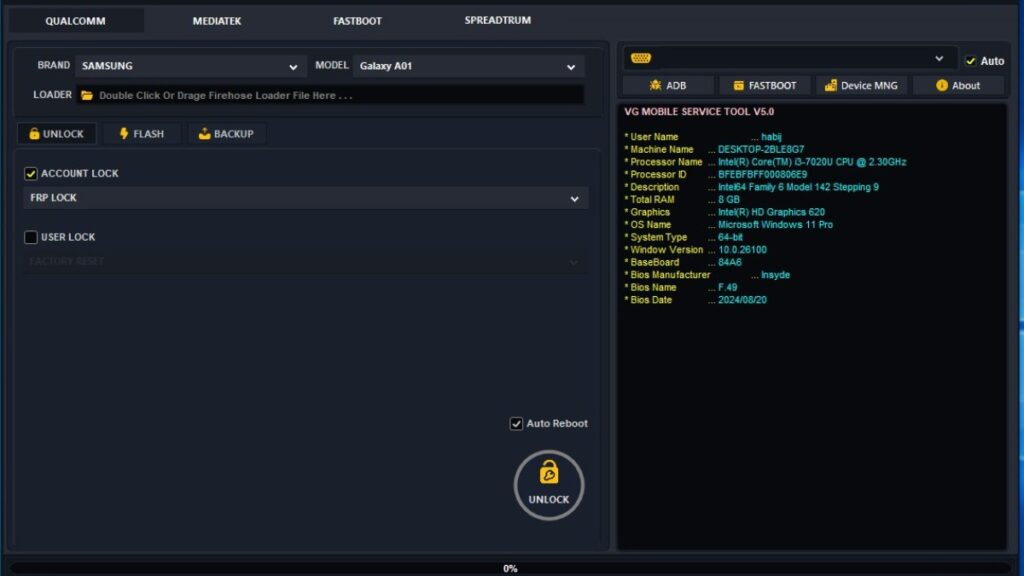
The V5.1 update for 2025 introduces enhanced features, expanded chipset support, and offline functionality, making it one of the most efficient and versatile tools available on the market.
Key Features of VG Mobile Service Tool 2025
1. Offline Functionality for Uninterrupted Service
One of the most important features of VG Mobile Service Tool is its offline functionality. This means that the tool can run without the need for an internet connection. This is particularly beneficial for mobile technicians working in areas with unstable or slow internet connections, allowing them to complete repairs without interruption.
2. Lifetime Activation
With the VG Mobile Service Tool, gone are the days of recurring subscription fees. Lifetime activation ensures that once you activate the tool, it remains functional forever. No additional payments are needed, making this a cost-effective solution for mobile repair shops and freelance technicians.
3. Broad Chipset Support
The VG Mobile Service Tool offers support for a wide range of chipsets, including Qualcomm, MTK (MediaTek), and Spreadtrum (SPD). This ensures that it is compatible with a broad spectrum of mobile devices, including both high-end flagship smartphones and budget devices from various manufacturers.
4. Advanced Device Operations
VG Mobile Service Tool allows technicians to perform several critical operations with ease, including:
- FRP Removal: Safely bypass or remove Factory Reset Protection (FRP) from Android devices, unlocking devices that are stuck on the Google verification screen.
- Screen Lock Removal: Unlock devices by bypassing PIN, password, or pattern locks.
- IMEI Repair: Modify or repair the IMEI number on supported devices to resolve network issues or for unlocking purposes.
- Bootloader Unlocking: For developers and custom ROM enthusiasts, the tool allows easy bootloader unlocking.
- Firmware Flashing: Flash the device’s firmware to reinstall or upgrade the operating system.
5. User-Friendly Interface
The VG Mobile Service Tool has a simplified and user-friendly interface that makes it easy for even beginners to use. The tool’s intuitive layout ensures that users can navigate through complex operations without difficulty.
6. Speed and Performance Enhancements
The latest update also focuses on speed and performance improvements. Operations that used to take several minutes are now completed much faster, helping technicians save valuable time and increase their productivity.
Download VG Mobile Service Tool V5.1 New Update 2025
| File Name: | VG Mobile Service Tool V5.1 With KEY-G |
| Size: | 617.6 Mb |
| Password | 123 |
| Support: | Telegram Channel |
How to Install VG Mobile Service Tool ?
Installation Steps:
- Download the Tool: Download VG Mobile Service Tool V5.1 from a trusted source. Ensure you are downloading the latest version.
- Disable Antivirus Software: Temporarily disable antivirus software, as it may interfere with the installation process.
- Install the Tool: Run the setup file and follow the installation wizard instructions.
- Activate the Tool: Once installed, activate the tool using the provided activation key. This grants you lifetime access to all features.
Usage Instructions:
- Connect Your Device: Use a USB cable to connect your device to your computer.
- Select the Operation: From the tool’s interface, select the operation you want to perform (e.g., FRP removal, lock removal, IMEI repair).
- Start the Operation: Click on “Start” to begin the process.
- Complete the Task: Wait for the process to complete, then disconnect your device once the operation is finished.
Alternate of VG Mobile Service Tool
Miracle Box
Key Features:
- Offers a comprehensive range of mobile repair functions, including FRP bypass, pattern lock removal, and IMEI repair Power of Miracle Box Tool.
- Supports a large variety of devices, including Android and iOS.
- Provides flashing, unlocking, and other advanced repair features.
- Popular for its easy-to-use interface and reliable performance.
Is VG Mobile Service Tool Legal to Use?
VG Mobile Service Tool is a legal software tool; however, it’s important to note that its use may have legal implications in certain regions. Modifying IMEI numbers or unlocking devices without proper authorization can be illegal in some countries. Always ensure that your use of the tool complies with local laws and regulations.
VG Mobile Service Tool Compatibility
This tool supports a wide range of Android devices, including those with Qualcomm, MTK, and Spreadtrum chipsets. It is compatible with most major brands like Samsung, Xiaomi, Huawei, Oppo, and Vivo. However, it’s always recommended to check compatibility for specific devices before performing any operations.
Read also: VG QuickUnlocker Tool V1.0 2025: Latest Update Download
Frequently Asked Questions (FAQs)
What is VG Mobile Service Tool?
VG Mobile Service Tool is a powerful mobile repair tool that allows technicians to unlock devices, remove screen locks, repair IMEI, bypass FRP, and flash firmware.
How does lifetime activation work?
Once you activate the VG Mobile Service Tool, you will have permanent access to the tool without needing to pay for subscriptions or renewals.
Can I use VG Mobile Service Tool to unlock any device?
The VG Mobile Service Tool supports a wide variety of Android devices. However, device compatibility may vary based on the chipset and brand. Always verify compatibility before use.
4. How can I remove FRP with VG Mobile Service Tool?
To remove FRP, connect the device, select the FRP removal option, and follow the instructions provided by the tool to bypass the Google verification screen.
5. Is VG Mobile Service Tool free?
No, VG Mobile Service Tool requires a one-time payment for activation, which grants lifetime access to all features.
6. What are the system requirements for VG Mobile Service Tool ?
VG Mobile Service Tool works on Windows operating systems. Ensure your system meets the minimum hardware requirements to run the tool smoothly.
Conclusion
The VG Mobile Service Tool V5.1 New Update 2025 is a game-changing solution for mobile repair technicians, offering powerful features, broad compatibility, and lifetime activation. Whether you need to unlock devices, repair IMEI numbers, bypass FRP, or flash firmware, this tool provides all the functionalities you need in a user-friendly interface.
Disclaimer
The VG Mobile Service Tool is intended for professional use by mobile repair technicians. The use of this tool for unauthorized unlocking, IMEI modification, or other illegal activities may be subject to legal consequences depending on local regulations. Always ensure that your use of this tool complies with the applicable laws in your jurisdiction. We do not endorse or support the unlawful use of the VG Mobile Service Tool.