Flashing firmware on your device can seem like a daunting task, especially if you’re new to the world of device maintenance and upgrades. If you’re using a device powered by an ASR chipset, the ASR Flash Tool is an essential utility that simplifies this process. This guide covers everything you need to know about the ASR Flash Tool, including what it is, how it works, and how you can use it to flash your ASR-powered devices with ease.
Table of Contents
What is the ASR Flash Tool?
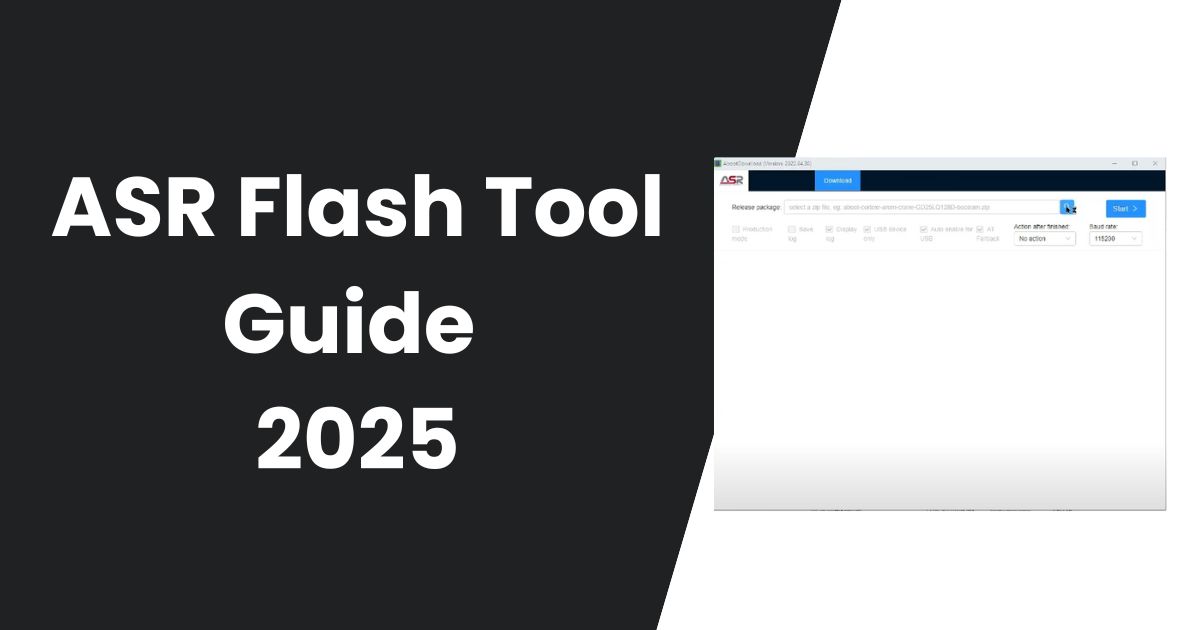
The ASR Flash Tool is a utility designed to flash firmware onto devices that are powered by ASR chipsets. It’s primarily used in development, production environments, and for regular firmware updates. The tool enables users to flash firmware files onto the device’s memory, erase existing firmware, and perform other essential device maintenance tasks. The ASR Flash Tool supports various file formats, and the process is relatively straightforward, making it an ideal solution for both beginners and experienced users alike.
Why Use the ASR Flash Tool?
Flashing a device’s firmware can offer several advantages:
- Firmware Updates: Keep your device’s software up to date by installing the latest firmware updates.
- Bug Fixes: Fix bugs and errors that might be affecting your device’s performance.
- Improve Performance: Firmware updates often include performance enhancements and optimizations.
- Custom Firmware: Install custom firmware for added features or to modify the device’s settings.
Download ASR Flash Tool (Latest Updated 2025)
Password: officialroms
| Name | Server 1 | Server 2 |
|---|---|---|
| ASR Flash Tool | Google Drive | MediaFire |
| ASR Driver | Google Drive | MediaFire |
Telegram Channel: For regular updates, support, and more resources, you can join our Telegram Channel where we share the latest firmware and flashing tools.
Key Features of the ASR Flash Tool
The ASR Flash Tool comes with a variety of features that make flashing easier and more efficient:
- Firmware Flashing: Easily install firmware onto your ASR-powered device with just a few clicks.
- USB and UART Support: Flash devices using USB or UART connections, allowing greater flexibility.
- Erase Function: Completely erase your device’s flash memory before installing new firmware to ensure a clean installation.
- Multiple Device Support: Flash multiple devices simultaneously to save time in production environments.
- Production Mode: Automate the process of entering production mode for large-scale deployments.
Read Also: UnlockTool Latest Version
How to Use the ASR Flash Tool?
Using the ASR Flash Tool is relatively simple. Here’s a step-by-step guide on how to get started:
Step 1: Prepare Your System
- Ensure your device is charged to at least 40-50%.
- Backup all your data, as flashing the firmware will erase everything from the device.
- Download and install the ASR Flash Tool on your computer.
- Make sure you have the latest version of the ASR drivers installed on your PC.
Step 2: Download Firmware
- Visit trusted websites, like officialroms.com, to download the correct firmware for your ASR device. Make sure you select the right version of the firmware for your device model.
Step 3: Launch the ASR Flash Tool
- Extract the downloaded ZIP file containing the ASR Flash Tool and run the executable file (
aboot.exe).
Step 4: Connect Your Device
- Turn off your ASR device.
- Connect the device to your computer using a USB cable or UART connection.
Step 5: Select the Firmware File
- In the ASR Flash Tool interface, click the “Browse” button to select the firmware file you want to flash onto the device.
Step 6: Start the Flashing Process
- After selecting the firmware file, click on the “Start” button to begin flashing the firmware onto your device.
- Wait for the process to finish. You will see a success message once the firmware has been successfully installed.
Step 7: Reboot Your Device
- After the flashing process is complete, disconnect the device from the computer and restart it.
- The device might take a little longer to boot up for the first time after a firmware update, so be patient.
Read also: Android Tool by Seharh – Unlock, FRP, Fix, and More
Frequently Asked Questions (FAQ)
What is the ASR Flash Tool used for?
The ASR Flash Tool is used to flash firmware onto devices powered by ASR chipsets. This tool helps update firmware, fix bugs, and improve device performance.
How do I install the ASR Flash Tool?
To install the ASR Flash Tool, download it from a trusted source like officialroms.com, extract the files, and run the executable file (aboot.exe). Make sure you also install the necessary drivers for your device.
Can I flash multiple devices at once?
Yes, the ASR Flash Tool supports flashing multiple devices simultaneously, making it perfect for production environments where you need to flash several devices at the same time.
Is the ASR Flash Tool safe to use?
Yes, as long as you are using the official versions of the tool and firmware, the ASR Flash Tool is safe to use. Always make sure to download files from trusted sources to avoid malware or corrupted firmware.
How long does it take to flash a device?
The flashing process typically takes between 5 to 10 minutes, depending on the firmware size and device model. However, the first boot after flashing may take longer than usual.
Final Thoughts
The ASR Flash Tool is an essential utility for anyone looking to flash firmware onto ASR chipset-powered devices. Whether you’re updating to the latest firmware, fixing bugs, or improving performance, this tool provides a reliable and easy-to-use solution. By following the steps outlined in this guide, you’ll be able to flash your device with confidence.
If you run into any issues or need further assistance, feel free to reach out or explore online communities and forums for support.
Read Also: Phone FRP Tool Free Download Easy FRP Bypass Method