In the ever-evolving world of mobile repair and Android system management, having a powerful yet lightweight tool is a game-changer. Enter RC DARK Tool v1.2.3 — a compact yet feature-rich utility tailored for Windows users who often deal with smartphone servicing, flashing, or optimization.
Earlier versions of this tool required a login or license activation, which sometimes led to delays or activation issues. But now, with the login requirement removed, it becomes easier than ever to access its full capabilities — responsibly.
Table of Contents
What Is RC DARK Tool?
RC DARK Tool is a Windows-based mobile phone utility tool primarily designed for Android smartphones. It helps technicians, developers, and mobile shop owners perform a variety of operations on devices — from reading device info to managing FRP, disabling system updates, and even app management.
Its standout features lie in the ADB, Fastboot, Xiaomi-specific tools, and IMEI utility modules, making it a go-to solution for day-to-day smartphone maintenance tasks.
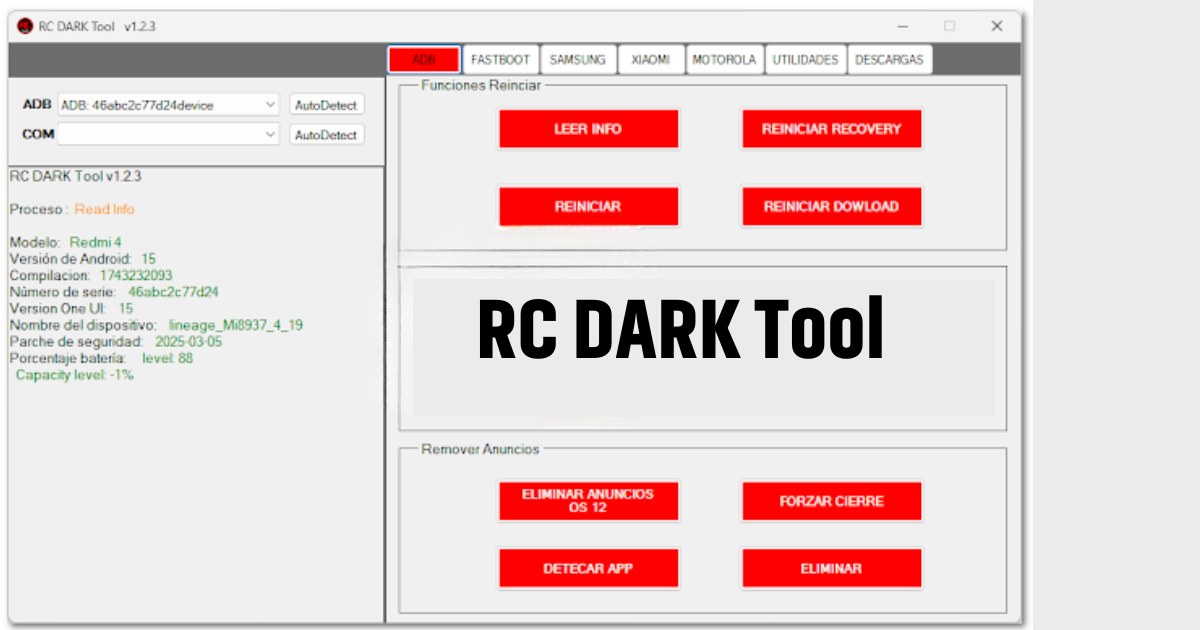
RC DARK Tool v1.2.3 – What’s New?
The v1.2.3 version of RC DARK Tool introduced several upgrades and additional features to improve usability and performance. Here’s what’s new in this update:
✅ Added Features
- IMEI Generator – Useful for testing and simulation
- OEM Info Editor – Supports PayJoy and Claro configuration
- FRP Key Unlock (Fastboot) – A quick solution for FRP-related issues
- Disable System Updates – Works on Samsung and Xiaomi
- Ad Remover – Especially for Android 12+
Key Features Overview
Let’s explore what each tab or section of the RC DARK Tool offers:
ADB Tab
- Read Device Information (Model, Build, Android Version, Serial, Battery, etc.)
- Reboot Options (Recovery, Sideload, Fastboot)
- Disable OTA Updates
- Install Magisk v26.3
- Remove System Ads
- Force Close Running Apps
Fastboot Tab
- Read Serial Numbers
- FRP Key Unlock (via Fastboot)
- Remote Commands
- Quick Reboot Options
Xiaomi-Specific Tab
- ADB Tools – Enable DIAG (root/no root), reboot to multiple modes
- Fastboot Tools – Bootloader unlock, EFS erase, QCN backup
Utilities Tab
- App Manager – Detect ports, read installed apps
- Uninstall or Disable Apps – User and system apps supported
OEM Info Editor
- PayJoy & Claro Sections – Modify OEM status safely
IMEI Generator
- Generate Dummy IMEIs – For testing dual SIM options
- User Input for First 8 Digits – Offers control and accuracy
System Requirements
To install and run RC DARK Tool smoothly, your system should meet the following requirements:
- OS: Windows 7/8/10/11 (32 or 64-bit)
- RAM: Minimum 2GB
- .NET Framework: 4.0 or higher
- Admin Access: Required for full functionality
RC DARK Tool v1.2.3 Free Download
| Tool Name | Download Link |
|---|---|
| RC DARK Tool v1.2.3 | Click Here to Download |
| Password | 123 |
| Telegram Channel for Support | Join Now |
How to Install RC DARK Tool v1.2.3 (Login-Free Version)
Here is a simplified, ethical guide to installing the tool:
- Download the Tool: Get the official version from trusted forums or the developer’s official community (avoid illegal mirrors).
- Extract the Archive: Use tools like WinRAR or 7-Zip to extract the downloaded .zip or .rar file.
- Install the Setup File: Follow the setup wizard to install the tool on your PC.
- Do Not Launch Immediately: After installation, do not run the tool right away.
- Copy Updated Executable (if legally obtained): If you’ve legally obtained a patch or unlocked version (with developer permission), replace the .exe in the install directory.
- Launch and Use: Run the tool via desktop shortcut. It should now operate without login prompts.
Who Can Benefit from RC DARK Tool?
This tool is ideal for:
- Mobile repair technicians
- Phone unlocking professionals
- Custom ROM developers
- Android enthusiasts
- Service center operators
Its easy-to-navigate interface and wide compatibility make it suitable even for users with minimal technical knowledge.
Why Login Removal Matters
In earlier builds, users were required to request login credentials — which were free but delayed. The new build either removes this requirement or simplifies activation, making the tool faster and more accessible. However, always ensure you’re using a legitimate version from trusted sources.
Pros and Cons
✅ Pros
- Lightweight and fast
- Wide range of Android tools
- No login hassle
- Works on many brands (Samsung, Xiaomi, etc.)
- Supports multiple Android versions
❌ Cons
- Windows only
- Some features require root access
- No official support if modified
Ethical Use Reminder
While RC DARK Tool provides powerful capabilities, always ensure:
- You use it on your own devices or with owner consent
- You don’t misuse IMEI tools for illegal activity
- You support the developer if using the tool for commercial purposes
FAQs – RC DARK Tool
Q1. Is RC DARK Tool legal to use?
A: Yes, if used on your own devices or with consent. Avoid unauthorized access or misuse of IMEI tools.
Q2. Does RC DARK Tool support Samsung and Xiaomi?
A: Absolutely. It has dedicated options for both, including OTA block, bootloader unlock, and more.
Q3. Is the tool free forever?
A: The current version doesn’t require login, but future versions may have a paid model. It’s best to support the developer.
Q4. Can I use RC DARK Tool on macOS?
A: No. It is a Windows-only application.
Q5. Is it safe to use a patched version?
A: Only use versions from trustworthy sources. Avoid cracked versions that may contain malware.
Final Thoughts
RC DARK Tool v1.2.3 is a strong utility for anyone working in mobile device servicing or Android modification. Its latest version eliminates login delays and brings faster access to tools that genuinely make mobile repair easier. Just remember to use it ethically and respect the developer’s work.
Disclaimer
This article is for educational purposes only. We do not host or promote cracked software. Always use tools responsibly and support original developers whenever possible.