Ever wanted to make your video games? Well, your fantasy has come true with Make Code Arcade. This is a beginner-friendly platform through which you can design, write, and play your very own games right from a browser. In the following article, let’s deep dive into the world of Make Code Arcade and explore its features that will guide you to get started step by step.
Table of Contents
What is Make Code Arcade?
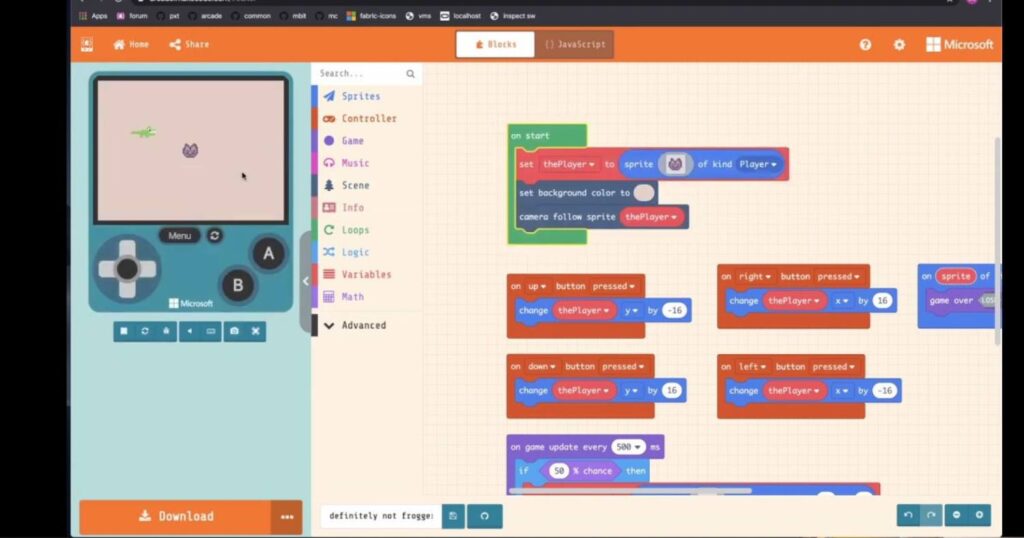
Make Code Arcade is a free online environment. Two things are combined inside programming blocks alongside JavaScript coding. The outcome of these two is an end-to-end, user-friendly approach toward game development, making it accessible to people of all ages and skill levels. It is a fun and engaging way through which you learn coding and also create your games for yourself, provided that you are just a complete novice or do some programming already.
Key Features of Make Code Arcade
- Visual Programming: Use drag-and-drop blocks to create game logic without ever having to write hard code.
- JavaScript Integration: Work your way from blocks to real JavaScript code as you get more and more skillful.
- Built-In Game Engine: A built-in game engine handles all the graphics, sound, and physics in your game.
- Community and Resources: Connect with other developers, share your masterpieces, and leverage hundreds of tutorials and examples.
- Hardware Compatibility: Code games for physical devices, like the Make Code Arcade Game Kit or the BBC micro: bit.
Benefits of Using Make Code Arcade
- Learn Coding in a Fun Way: Game development is a motivating way to learn coding concepts.
- Develop Problem-Solving Skills: Creating games requires logical thinking and creative problem-solving.
- Build a Portfolio: Show off your game development skills to a potential employer or college.
- Foster Creativity: Express your imagination and design unique game worlds.
- Connect with a Community: Be part of a fabulous community of developers.
Getting Started with Make Code Arcade
- Visit the Website: Go to https://arcade.makecode.com/ and click on “Arcade”.
- Create a Project: Use a template or start from scratch to begin your game.
- Explore the Interface: Take time to understand what’s available – blocks, sprites, and backgrounds.
- Start Coding: Get into the code using blocks where you can build out the logic for your game, manage sprites, and more.
- Test and Iterate: Play your game to find bugs or areas that need improvement. Make adjustments and test again.
- Publish Your Game: Share your game online or download it to play on a physical device.
Tips for Beginners
- Keep It Small: Start with small games like platformers or shooters.
- Divide and Conquer: Divide your game into smaller, manageable steps.
- Tap the Community: Do not hesitate to ask for help or share what you have created.
- Experiment and Have Fun: Try several approaches; don’t be afraid to make mistakes.
Examples of Games Created with Make Code Arcade
- Pixel Art Adventures: Make delightful games in the style of 8-bit utilizing retro graphics.
- Puzzles and Brain Teasers: Create challenging puzzles that test the problem-solving abilities of the players.
- Multiplayer Games: Team up with friends and create multiplayer experiences.
- Educational Games: Teach programming concepts while making games.
Conclusion
Make Code Arcade is an excellent point to begin with if one is interested in making games. The application features a friendly interface, robust capabilities, and community support to engage and entertain one while learning to code and develop games. So, what are you waiting for? Start making it today in game development and unleash your creativity!
Read Also: