The mobile servicing and phone repair industry has transformed rapidly over the years. With constant OS updates and tighter security measures from smartphone brands, technicians need powerful tools that stay ahead of the curve. Enter APIZU Tool V4.1.5 PRO—a cutting-edge utility built for Android device management, unlocking, and software fixes.
In this article, we’ll explore the features, advantages, supported functions, and safety of APIZU Tool V4.1.5 PRO, ensuring you understand how it can be a game-changer for mobile technicians and phone repair shops.
Table of Contents
What is APIZU Tool V4.1.5 PRO?
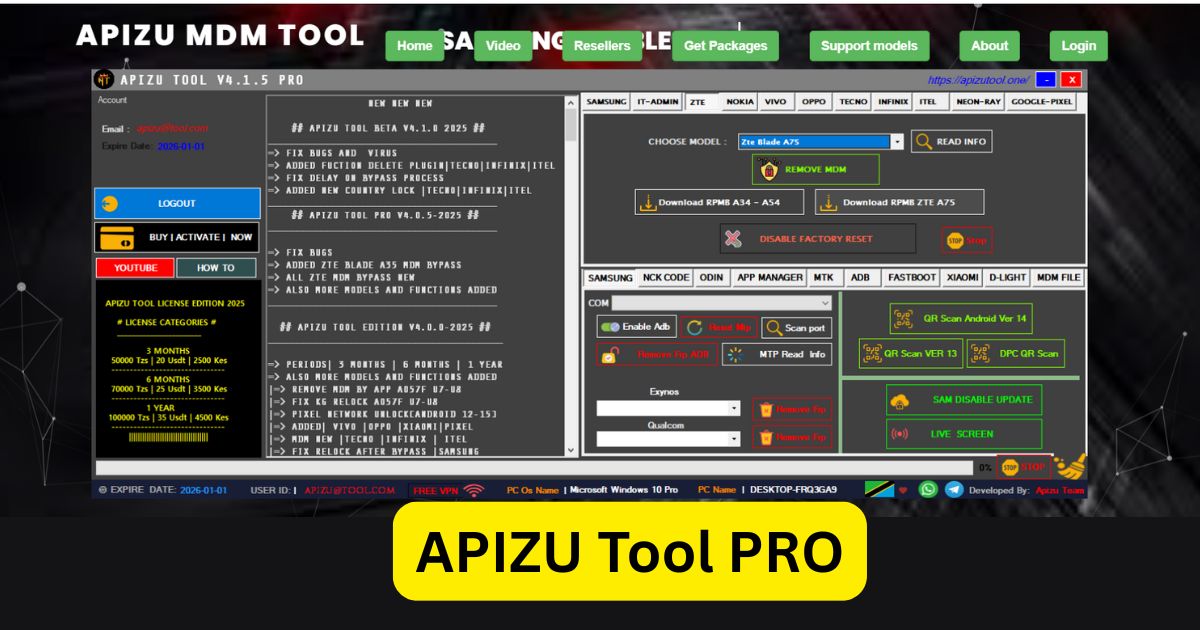
APIZU Tool V4.1.5 PRO is the latest professional version of the APIZU Android service software suite. It offers a wide range of functions including:
- MDM (Mobile Device Management) Bypass
- FRP (Factory Reset Protection) Removal
- ADB Fastboot Controls
- QR ADB Scanning
- Black Screen Fixes
- Google Account Unlocking
- Samsung Admin Removal
- ZTE RPMB Unlocking
- And much more
This version is part of the Pro Series, meaning it includes enhanced features not available in the free or trial versions. It’s used extensively by Android technicians, service centers, and individuals who need to regain access to locked or bricked phones.
Key Features of APIZU Tool V4.1.5 PRO
1. MDM Lock Removal
Mobile Device Management (MDM) is a feature often used by companies to restrict access to a phone. APIZU Tool offers one-click MDM bypass for brands like Samsung, Nokia, and others. This is extremely useful for devices that were previously managed under enterprise-level security.
2. FRP Bypass (Factory Reset Protection)
FRP is designed to prevent unauthorized access after a factory reset. However, in legitimate scenarios (like reselling a phone), it can be an obstacle. APIZU allows easy FRP removal on Android devices including Samsung, Tecno, Infinix, and Vivo.
3. ADB and Fastboot Tools
Technicians can use ADB (Android Debug Bridge) and fastboot commands directly from the tool. This includes pushing files, sideloading ROMs, wiping partitions, or unlocking bootloaders.
4. QR-Based ADB Activation
When USB debugging is off, APIZU Tool provides a QR code that can be scanned to enable ADB mode—no PC-side access needed.
5. Device-Specific Fixes
Whether you’re dealing with a black screen, stuck bootloader, or locked admin panel, APIZU offers specialized functions to resolve them. Brands like ZTE, Xiaomi, Tecno, Itel, and Oppo are all supported.
Supported Devices and Brands
Here are some of the major Android phone brands supported in V4.1.5 PRO:
- Samsung: MDM removal, FRP bypass, and Knox-related functions
- Nokia: Admin unlocks and MDM removals
- Tecno/Infinix/Itel: Black screen and FRP fixes
- ZTE: RPMB unlock and fastboot fixes
- Xiaomi/Redmi: Limited functions via fastboot and sideload
- Vivo/Oppo: MTK-based servicing and unlock
- Pixel: Google account bypass and ADB fixes
The tool supports phones running Android 6 to Android 13+, making it compatible with both older and modern smartphones.
What’s New in Version 4.1.5?
- ✅ Final PRO version release (not beta)
- ✅ New device drivers and brand compatibility added
- ✅ Improved QR-ADB scanning for seamless USB-less access
- ✅ Bug fixes from earlier builds (v3.6.x and v4.0)
- ✅ Faster interface and cleaner logs
- ✅ Enhanced support for Android 13 and some early Android 14 builds
These updates make it more stable and reliable for day-to-day technician work.
Is APIZU Tool Legal and Safe to Use?
Yes—when used for legitimate purposes, such as:
- Removing MDM on your own company-owned devices
- Unlocking FRP for phones you legally own or service
- Fixing bricked or black-screen issues due to OS failure
Google’s policy does not allow promoting piracy or illegal unlocking. This article and APIZU itself should not be used for hacking or unethical bypassing. Always ensure you have permission from the device owner before using such tools.
Download APIZU Tool V4.1.5 PRO
| Tool Name | Download Link |
|---|---|
| APIZU Tool V4.1.5 PRO | Click Here to Download |
| Telegram Channel for Support | Join Now |
How to Download and Use APIZU Tool V4.1.5 PRO
Download the Setup File
Begin by downloading the official installation package from the link provided.
Extract the Downloaded File
Once the ZIP or RAR file is downloaded, right-click on it and choose “Extract” using software like WinRAR or 7-Zip.
Temporarily Disable Antivirus Software
To avoid any disruptions during installation, it’s recommended to turn off your antivirus protection. You can re-enable it after the setup is complete.
Install the Tool
Open the extracted folder and run the installer. Follow the on-screen instructions to complete the installation process.
Desktop Shortcut Auto-Generated
Upon successful installation, a shortcut icon for the tool will be created on your desktop.
Launch as Administrator
For optimal performance, right-click the shortcut and select “Run as administrator.”
Register Your Account
Input your email and password to register. No email verification is required.
Login to Access the Tool
After registration, enter your login credentials and click the “Login” button.
Start Exploring Features
You now have access to the full user interface. Most core features are available for free or with fixed access, although some advanced options may require credits.
Make sure you have a proper internet connection and updated drivers installed.
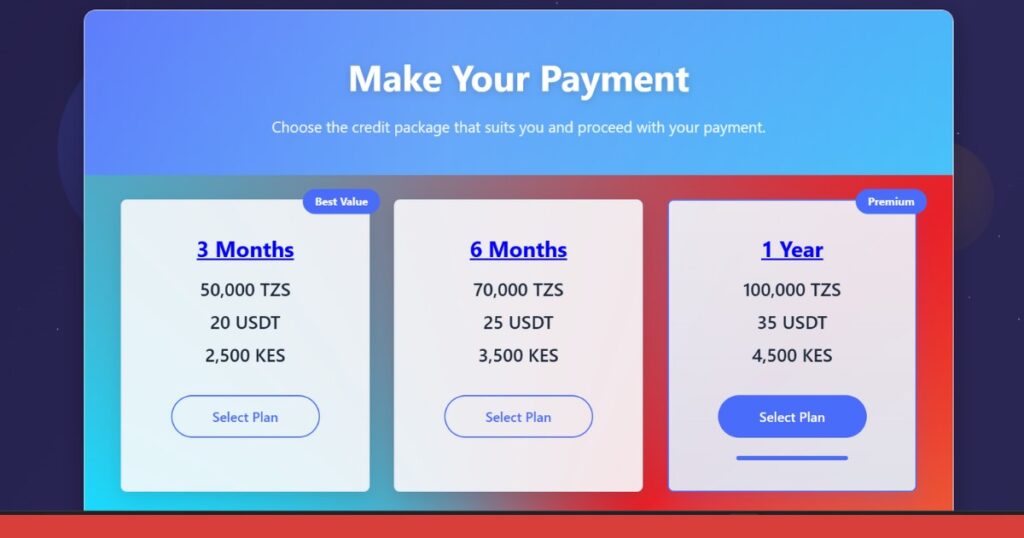
Activation and Pricing (All price in USDT)
APIZU Tool V4.1.5 PRO requires activation, which is available in multiple plans:
- 3-Month Plan – 20
- 6-Month Plan – 25
- 1-Year Plan – 35
You’ll receive login credentials for software activation. Avoid cracked versions—they may contain malware or fail to deliver updates.
Why Technicians Love APIZU Tool
✅ All-in-One: No need for multiple tools—APIZU covers 90% of technician needs
✅ Active Support: The team updates it frequently and shares guides via Telegram and TikTok
✅ User-Friendly UI: Easy for beginners and fast for experts
✅ Lightweight: Runs smoothly even on older laptops
✅ Safe and Legal: When used responsibly and with permission
FAQs
❓Is APIZU Tool free to use?
No, the PRO version requires a paid license. However, some basic features may be available in earlier free versions.
❓Can I use APIZU Tool on Mac or Linux?
No, it is a Windows-only tool. Use a Windows PC or virtual machine to run it.
❓Is it safe to bypass FRP or MDM with this tool?
Yes, but only if you have ownership or written permission. Unauthorized use can be illegal.
❓What happens if I use a cracked version?
Cracked tools often contain malware or spyware. Always use official sources for activation.
Final Words
If you’re a mobile phone technician, small shop owner, or just someone dealing with Android servicing regularly, APIZU Tool V4.1.5 PRO is a must-have. Its wide range of device support, modern UI, fast action processing, and QR-based ADB method make it one of the most versatile Android unlocking tools in 2025.
Just remember: always use tools like this ethically and legally. Avoid using it for illegal bypassing or unauthorized repairs, and you’ll find it an indispensable asset in your toolkit.