Xiaomi Redmi 6 Pro Into EDL Mode
EDL mode is the most important part of this Mi account bypass method. If the bootloader of the device is locked then you can’t flash MIUI Fastboot ROM directly. Mi flash tool will show the error.
So we are assuming that your Redmi 6 Pro bootloader is locked and we will boot it into EDL mode via test point. The process is here.
- At first open device Manager on your pc & don’t close the window.
My Computer >> Right Click > Manage > Device Manager - Next power off the locked Redmi 6 Pro properly.
- Open back cover of the device safely. Process is little bit technical, so please Do Google to learn “how to open back cover of Redmi 6 Pro]
- Once the back cover removed, remove the battery terminals first. [Don’t forget to remove battery points, its important]
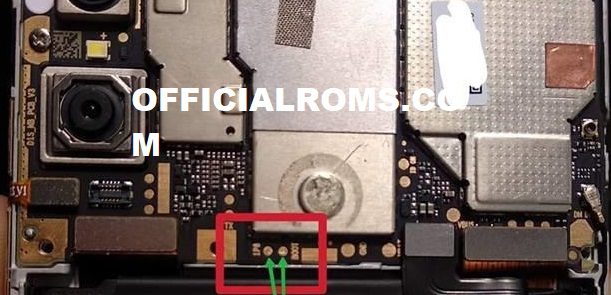
- Next, short the test point using any copper wire or pin. Check the below screenshot and short the same points only.
- At the same time of shorting test points, connect the phone with pc via USB cable. [If getting difficulty, take help of your family member or friend]
- As soon as you will connect the device with pc, Qualcomm HS-USB QDLoader 9008 Port will reflect in device manger.
Please Note: Qualcomm HS-USB QDLoader 9008 Port must be visible under the Device Manager section. If it’s not reflecting, repeat the above process properly.
- Now keep the phone aside and don’t unplug the cable.
- Device is now connected with pc into edl mode and you are ready to delete Mi account.
Redmi 6 Pro Mi account Remove File Download
Size: 216 KB
Password: officialroms
Miracle Thunder 2.82 Download (Working Without Dongle)
File Size: 713 MB
Password:-officialroms
Redmi 6 Pro Using Miracle 2.82 Tool
Once the device booted into EDL mode, use a free Miracle 2.82 flash tool to remove Mi account verification.
- Disable antivirus on the pc. Otherwise, it will remove Miracle loader.exe file.
- Extract the downloaded Miracle 2.82 and run Miracle setup as administrator.
- Wait to launch Miracle 2.82 properly.
- Navigate to “Qualcomm” >> “Extra” tab.
- Click on the “Port” button and select the “Qualcomm HS-USB QDLoader 9008” port.
- Tick on “Mi Account Unlock” and select the “Redmi Note 5 ” option from the drop-down menu.
- Hit on the “START” button to start the Mi account bypass process on Redmi 6 Pro.
- The tool will start it’s work and just in a few seconds devices will reboot automatically.
- All Done!!!! Mi account removed from Redmi 6 Pro MIUI10 successfully Fixed Relock Problem.
- Attach the battery connector again, fix the back cover properly and reboot it normally.
The device may take a long time to reboot after applying the mi account removal process. So sit back and wait for normal boot.
Readme also