Burmese Xiaomi Authentication Flasher v1.3 is a Windows application developed by Prince, that enables you to flash your Xiaomi smartphones and tablets. It features an easy-to-use graphical interface with Wipe Data via EDL Mode as well as the option of changing China Rom to Global without unlocking the boot loader.
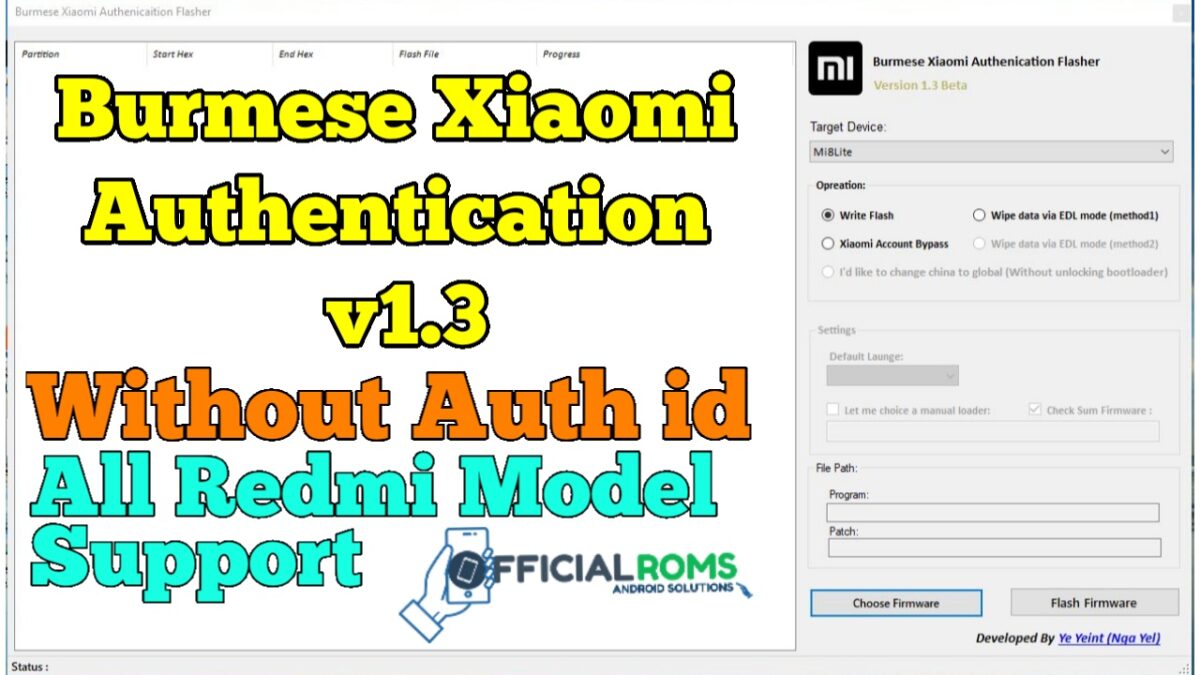
Burmese Xiaomi Authenication Flasher v1.3.0 supports Xiaomi Mi 8 Lite/ Mi 8 Special Edition/ Mi Max 3(Oxygen), Mi Max 32GB/ 64GB, Note 3, Redmi 3S(Ido), Redmi 3W(Prada), 4A/4C/4 Prime(Markw), 4X(Santoni), Redmi 5 Plus/5X/Redmi 6 Pro/6X(Wayne), Redmi Note 1(Gucci), Note 3 Pro(Mido), Note 5A (Ugglite), Note 5A Prime (Ugglite), Note 5 Pro(Ysl), Xiaomi S2 (Ysl), Xiaomi 4 (Leo), as well as Xiaomi Note LTE models.
To fully utilize the Burmese Xiaomi Authentication Flasher, you must install Universal ADB Driver on your Computer. After this is done, your can successfully connect your Android Device to the computer and launch the Tool from within it.
Burmese Xiaomi Authentication Flasher v1.3
File Name: Burmese_Xiaomi_Authenication_Flasher_v1.3 by officialroms.com.exe
Alternative Name: Burmese Xiaomi Authentication Flasher
Review: Watch Video Review
File Version: v1.3
Password: officialroms.com
File Size: 11.9 MB
Link: Userupload
Readme Once: Unbrick Redmi Note 7 EDL Test-Point Mode Without Authorized Account Flash File
Compatible: The Redmi Flash Tool runs smoothly on Windows XP Windows Vista Windows 7 Windows 8 Windows 8.1 and Windows 10 (32 bit and 64 bit).
Take a Backup: If you are going to try the above tool then please take a backup of your Android Smartphone or Tablet as flashing any recovery or file may brick the device.
Other Tools: If you are searching for other useful tools then follow our Tools Section to download free GSM Tools.
Credits: Burmese Xiaomi Authentication Flasher is created and distributed by Prince (developer). So, full credits go to Prince (developer) for sharing the tool for free.