In the world of Android, fastboot mode is an essential utility for managing your device’s system at a low level. The Android Fastboot Reset Tool has become an indispensable tool for users looking to bypass security measures like FRP (Factory Reset Protection), unlock bootloaders, delete Mi Account data, and much more. With the release of V2.0, this tool has taken things to the next level, offering even more powerful features and a more user-friendly interface. This article will walk you through the features of the Android Fastboot Reset Tool, its different versions, and how to use it to unlock your device.
Table of Contents
What is the Android Fastboot Reset Tool?
The Android Fastboot Reset Tool is a specialized utility designed for Android smartphones. It enables users to perform a variety of tasks, including bypassing the FRP lock, unlocking bootloaders, and deleting Mi Accounts or Google Accounts from locked devices. The tool operates in fastboot mode, which is a diagnostic mode that allows communication between the device and the computer for low-level operations like system recovery and firmware flashing.
Compatible with most Android smartphones, the Fastboot Reset Tool works on Windows PCs, making it accessible to a wide range of users. Whether you’re dealing with a locked device, a forgotten password, or a bricked phone, this tool can be a lifesaver.
Key Features of the Android Fastboot Reset Tool (V1.2 & V2.0)
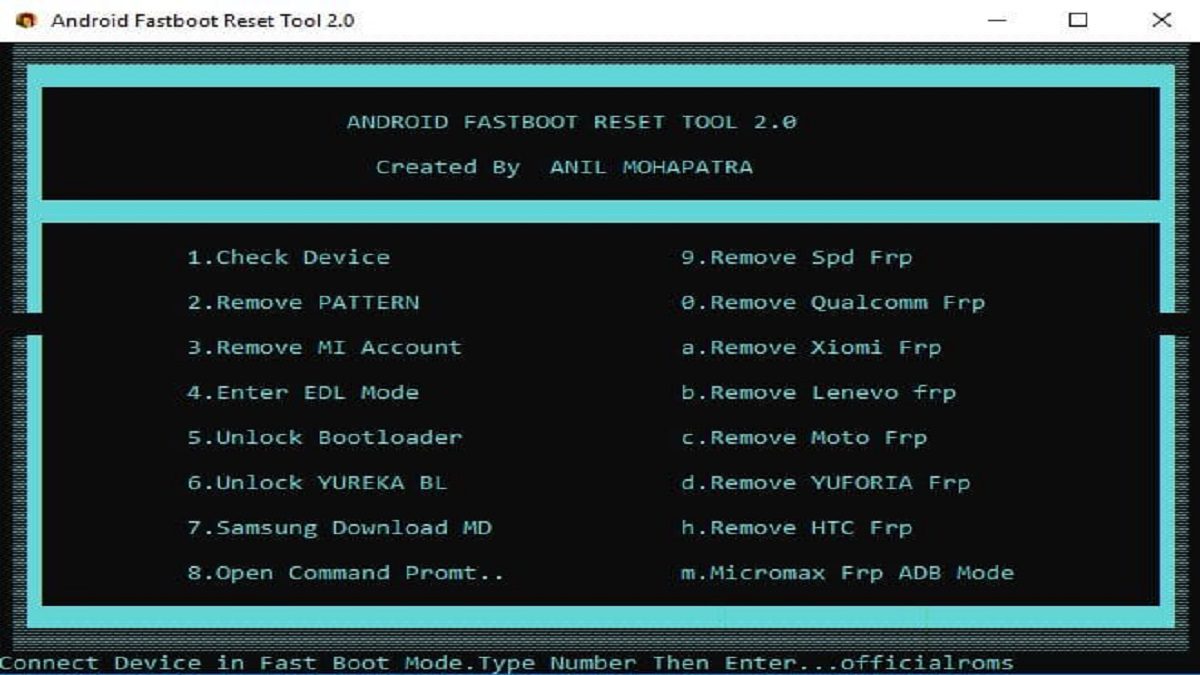
1. FRP (Factory Reset Protection) Removal
One of the most significant challenges for Android users is dealing with FRP. When you perform a factory reset on a device with an active Google Account, it locks the device until the original account credentials are entered. The Android Fastboot Reset Tool can bypass this FRP lock, allowing you to access the device again without needing to remember the original account details.
- V1.2: Offered basic FRP removal functionality for multiple devices.
- V2.0: Enhanced FRP bypass features, adding support for more brands and a streamlined process.
2. Pattern Unlocking
Forgot your device’s lock pattern? The Android Fastboot Reset Tool can help you remove the pattern lock on your Android device. This feature is useful if you’ve locked yourself out of your phone or tablet and need a quick way to regain access.
3. Unlocking Bootloader
Many Android users like to customize their phones by flashing custom ROMs, rooting their devices, or installing new firmware. However, these actions often require an unlocked bootloader. The Android Fastboot Reset Tool makes it easy to unlock the bootloader on most devices, enabling you to perform these customizations.
- V1.2: Basic bootloader unlocking with support for major brands.
- V2.0: Supports even more devices and includes additional security warnings and steps to ensure the process is safe.
4. Deleting Mi Account Data
For users of Xiaomi devices, the tool can delete the Mi Account, which is often required to unlock the device or perform a factory reset. This is especially helpful if the Mi Account is still linked to a device after a factory reset, preventing access.
5. Enter EDL Mode
EDL (Emergency Download Mode) is a mode used by some Android devices for deep-level repairs or flashing stock firmware. The Android Fastboot Reset Tool can boot your phone into EDL mode, which is essential for certain types of repairs, such as unbricking your device.
6. Remove Other FRP Locks
In addition to Google’s FRP, the Android Fastboot Reset Tool can bypass FRP locks on a variety of devices from different manufacturers, including:
- Mi Account FRP
- Qualcomm FRP
- Lenovo FRP
- Motorola FRP
- HTC FRP
- Micromaxx FRP
- Yureka FRP
These additional FRP bypass features are highly useful for users with a variety of Android devices.
Why You Should Download the Android Fastboot Reset Tool
1. Wide Device Compatibility
One of the primary reasons to download the Android Fastboot Reset Tool is its broad compatibility. The tool supports a wide range of Android devices from different manufacturers, including Xiaomi, Samsung, Motorola, Lenovo, and many more.
2. Simple and Efficient
Whether you’re a developer or an average user, the Android Fastboot Reset Tool simplifies the process of unlocking your device. It automates several critical operations, allowing you to bypass locks and reset the device without requiring deep technical knowledge.
3. Bypass FRP Locks
FRP locks can be one of the most frustrating issues for Android users, especially if you’ve forgotten your Google credentials. With this tool, you can bypass FRP locks quickly and easily, saving time and avoiding the need for complicated workarounds.
4. Unlock Bootloaders
Unlocking the bootloader on Android devices is an essential step for users who want to root their phones or install custom ROMs. The Android Fastboot Reset Tool provides an easy way to unlock bootloaders, even for devices that traditionally have locked bootloaders.
How to Use the Android Fastboot Reset Tool (V2.0)
To get started, download the Android Fastboot Reset Tool from the official website. Ensure that you download the correct version (V2.0) for your Windows PC. Once downloaded, run the executable file to install the tool.
Enter Fastboot Mode
After installing the tool, you need to boot your Android device into fastboot mode. To do this:
- Power off your device.
- Hold the Power button and the Volume Up button simultaneously to enter fastboot mode.
Connect Your Device to the Computer
Connect your Android device to your computer using a USB cable. Make sure that your computer detects the device in fastboot mode.
Select the FRP Bypass Option
Launch the Android Fastboot Reset Tool and select the appropriate FRP bypass option for your device model. The tool will display a list of FRP bypass options for different brands, including Xiaomi, Samsung, Motorola, and others.
Start the Unlock Process
After selecting the appropriate FRP bypass option, press Enter to initiate the unlocking process. The tool will begin removing the FRP or pattern lock on your device.
Reboot Your Device
Once the process is complete, your device will be unlocked. You can now reboot the device by typing the following command:
Your device will now boot into the home screen, free from any lock or FRP protection.
Download Android Fastboot Reset Tool
To download the latest version of the Android Fastboot Reset Tool (V2.0), visit the official download section. Password: officialroms is required to access the download link.
Important Warning
While the Android Fastboot Reset Tool is a powerful and useful utility, it’s essential to proceed with caution. Flashing or unlocking your device can void your warranty and may cause data loss. Always back up your data before using the tool. Officialroms.com cannot be held responsible for any damage caused to your device during the process.
Conclusion
The Android Fastboot Reset Tool (V2.0) is an indispensable utility for anyone looking to unlock, reset, or repair their Android device. With powerful features like FRP bypass, bootloader unlocking, and support for a wide range of devices, this tool offers an efficient way to manage your device’s software. Whether you’re an advanced user or a beginner, the tool’s user-friendly interface and comprehensive features make it easy to unlock your device and remove any unwanted locks or restrictions.