If you frequently work with Android smartphones, whether as a repair technician or a tech-savvy user, having the right software tools can save you countless hours. GSM RK Tool is a powerful, all-in-one solution that enables users to perform a wide range of advanced Android tasks with ease. From removing FRP (Factory Reset Protection) locks and bypassing Mi accounts to fixing system errors and unlocking bootloaders, this tool simplifies complex operations into just a few clicks.
In this article, we’ll dive deep into everything you need to know about GSM RK Tool, including its top features, installation steps, safe usage practices, and how it stands out among Android repair utilities.
Table of Contents
What is GSM RK Tool?
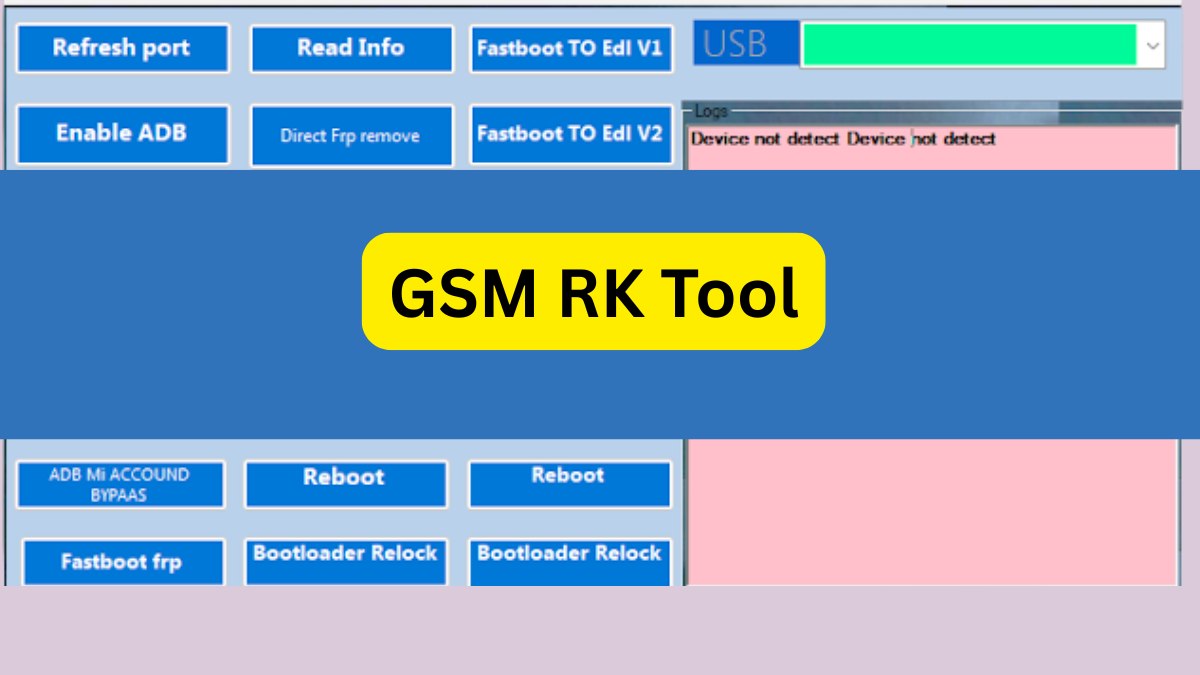
GSM RK Tool is a lightweight yet robust Android repair utility compatible with major brands like Samsung, Redmi, OPPO, Realme, and OnePlus. Its intuitive interface and built-in automation make it ideal for both beginners and professionals.
Whether you’re dealing with an FRP lock after a factory reset or facing a bootloop or fastboot issue, GSM RK Tool offers quick, straightforward solutions—no programming knowledge required.
Key Features
- Samsung FRP Removal
- Samsung Account Removal
- OPPO / Realme / OnePlus Demo Mode Removal
- ADB Live Screen Access
- System Destroyed Fix for Corrupted Android OS
- DM Verity Fix
- Redmi Fastboot MDM Reset
- Mi Account Bypass (ADB & Fastboot)
- Fastboot to EDL Mode (v1 & v2)
- Fastboot Bootloader Unlock (v1 & v2)
- Direct FRP Remove (Fastboot/ADB)
- Factory Reset, Reboot, ADB Enable, and Port Refresh
These features are tailored to address both common and complex Android software issues, making GSM RK Tool a comprehensive repair toolkit.
GSM RK Tool V1.1 Free Download
| Tool Name: | GSM RK Tool |
| Version: | 1.1 |
| File Type: | ZIP (No password required) |
| File Size: | 11 MB |
| License: | Freeware |
| Download Tool: | Mediafire |
How to Use GSM RK Tool
Step 1: Download the Tool
Visit a trusted source such as the developer’s official site or a well-known GSM community forum to download the ZIP file.
Step 2: Extract the Files
Use extraction tools like 7-Zip or WinRAR to unzip the contents to a dedicated folder, preferably on your desktop or C: drive.
Step 3: Temporarily Disable Antivirus Software
Due to the nature of deep system-level access, some antivirus programs might falsely flag the tool. Temporarily disable your antivirus if necessary.
Step 4: Run as Administrator
Right-click on GSM RK IT ADMIN TOOL.exe and choose “Run as administrator” to ensure proper system-level permissions.
Step 5: Connect Your Android Device
Use an original or high-quality USB cable to connect your smartphone. Make sure USB debugging is enabled if required.
Step 6: Choose and Run Your Task
From the tool’s interface, select your desired action—FRP removal, Mi account bypass, bootloader unlock, or other operations—and let the tool perform the task.
Why Choose GSM RK Tool?
- Completely Free and Lightweight: Unlike many paid tools, GSM RK Tool is 100% free and consumes minimal system resources.
- Multi-Brand Support: Compatible with popular Android brands like Samsung, Redmi, Realme, OPPO, and OnePlus.
- User-Friendly Design: No need for command lines or scripts; the interface is intuitive and simple.
- Regular Updates: The tool is frequently updated to support new features, device models, and security patches.
Use Cases and Real-World Applications
- Mobile Repair Shops: Ideal for quick, professional repair and unlocking services.
- DIY Enthusiasts: Perfect for tech hobbyists who enjoy tweaking or restoring their devices.
- System Recovery: Useful for resolving bootloops, system corruption, and OS-level issues.
- FRP Lock Scenarios: Effective when users are locked out after a factory reset due to forgotten Google credentials.
Safety and Legal Considerations
To remain compliant with policies and legal guidelines, use GSM RK Tool only on devices that you own or have explicit permission to repair. Unauthorized use for commercial unlocking or bypassing security features is discouraged.
Additional best practices:
- Always back up important data before proceeding.
- Install the correct USB and device drivers.
- Only download the tool from trusted sources to avoid malware.
- Be cautious when disabling antivirus programs and re-enable them after installation.
Frequently Asked Questions (FAQs)
Q1: Is GSM RK Tool safe to use?
Yes, as long as it is downloaded from a trusted source and used ethically.
Q2: Do I need an internet connection?
No, GSM RK Tool functions completely offline.
Q3: Will it support every Android phone?
While it supports many major brands, not all models are compatible. Always verify your device’s compatibility beforehand.
Q4: Can I unlock the bootloader without enabling OEM unlock?
In most cases, fastboot-based unlocks require OEM unlocking to be enabled from developer settings.
Q5: Is the tool really free to use?
Yes, GSM RK Tool is freeware with no hidden costs or subscriptions.
Final Thoughts
GSM RK Tool stands out as a powerful, versatile, and completely free Android repair utility. Whether you’re unlocking a bootloader, removing an FRP lock, or fixing a corrupted OS, this tool simplifies advanced tasks for beginners and experts alike.
When used responsibly and ethically, GSM RK Tool can be an invaluable asset in your Android maintenance toolkit. Its regular updates and broad compatibility make it one of the best free tools available today.
Disclaimer: This article is intended for educational purposes. Use GSM RK Tool only on devices you legally own or have been authorized to repair.