If you’re looking for a powerful Android servicing tool that is free, offline, and dongle-free, the MCT Dongle Tool V4.2 (2025) is one of the most reliable options available today. This all-in-one Android repair tool supports a wide range of MediaTek and Qualcomm devices and is now available with lifetime activation—no dongle required.
Table of Contents
What is MCT Dongle Tool?
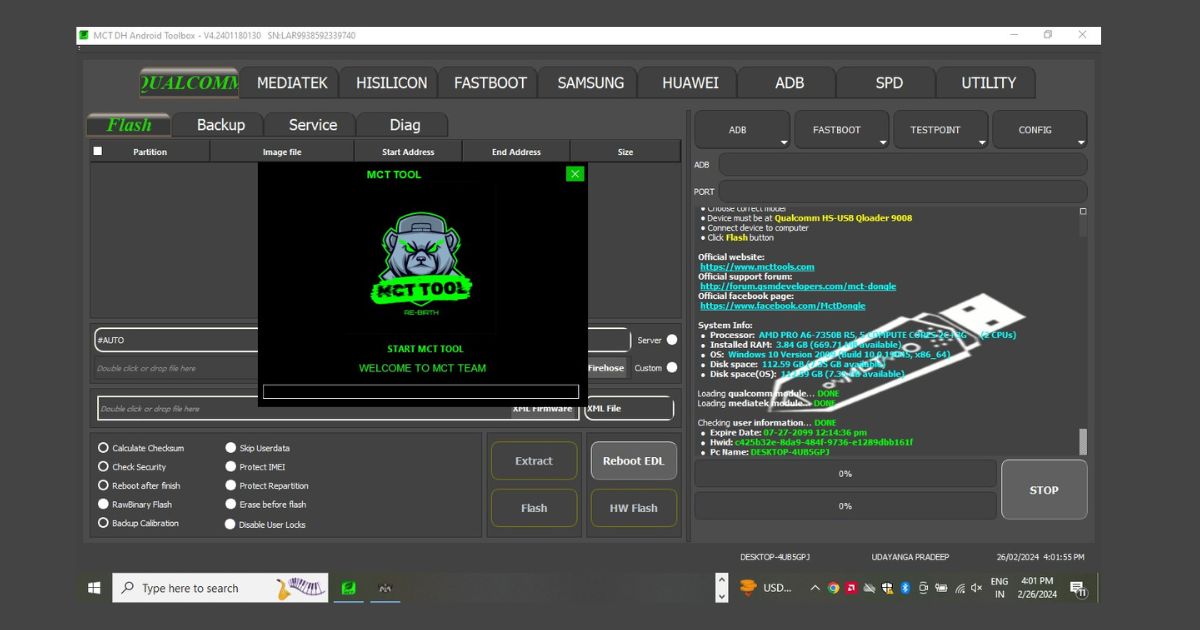
The MCT Dongle Tool, also referred to as the MCT Tool, is a professional software utility used by mobile technicians to perform complex repair functions on Android smartphones and tablets. It was originally developed to work with a hardware dongle, but version 4.2 eliminates this requirement by including a loader and keygen for lifetime free activation.
The tool supports major tasks such as:
- FRP (Factory Reset Protection) bypass
- Flashing firmware on MTK and Qualcomm devices
- IMEI repair for MTK devices
- Bootloader unlocking and relocking
- Safe format without data loss
What’s New in MCT Tool V4.2 (2025 Update)
Dongle-Free Activation
MCT Dongle Tool V4.2 now works without any physical dongle. Users can activate the full version using the included loader and keygen. After activation, the tool operates completely offline.
Updated Chipset Compatibility
The latest version supports a broader range of modern chipsets, including:
- MediaTek G99, Dimensity 810
- Qualcomm Snapdragon 720G, 765G
- Unisoc SC9863A, SC9832
- HiSilicon and select Exynos models
New One-Click Functions
MCT Tool now includes simplified functions for faster servicing:
- FRP bypass for Android 10, 11, 12, and 13
- Pattern unlock without data wipe
- Mi Account removal
- Safe format without data loss
Key Features of MCT Dongle Tool
FRP Bypass
The tool allows technicians to bypass Google FRP lock on supported devices from brands such as:
- Samsung
- Xiaomi
- Realme
- Vivo
- Oppo
- Infinix
- Tecno
Firmware Flashing
MCT Tool supports multiple firmware formats:
- MTK scatter file flashing
- Qualcomm rawprogram, XML, and BIN file flashing
- OFP format used in Realme and Oppo devices
Bootloader Unlocking
Unlock and relock bootloaders with one click. This is useful for rooting, installing custom ROMs, or fixing bootloop issues.
Partition Backup and Restore
Securely back up critical partitions including system, boot, vendor, recovery, and EFS. This helps protect devices during complex operations.
IMEI Repair (MTK Only)
The tool allows users to write or restore IMEI numbers for MediaTek devices for authorized and legal purposes. This can resolve issues like null or invalid IMEI after flashing.
Read Also: MTK Auth Bypass Tool Latest 5G CPU
Download MCT Tool 4.2 Setup
| MCT Tool 4.2 Setup Free Use |
| MCT Tool 2.1.3 Setup |
| MCT Tool 2.1.2 Setup |
| MCT Tool 2.1.1 Setup |
| MCT Tool 2.1.0 Setup |
| MTK USB Driver |
| Qualcomm USB Driver |
Read Also: All Oppo & Realme| How to MCT OFP Extractor Tool Free Tool
Why Use MCT Tool in 2025?
Here are some reasons why MCT Dongle Tool V4.2 is considered a top-tier utility in mobile phone servicing:
- Lifetime activation with no hidden costs
- Offline functionality for increased privacy and speed
- Compatible with the latest MediaTek, Qualcomm, and Unisoc chipsets
- No dongle or special hardware required
- Beginner-friendly interface with powerful backend features
How to Use MCT Dongle Tool
Follow these steps to get started with MCT Tool:
- Download MCT Dongle Tool V4.2 from a trusted source
- Extract the downloaded file and run the loader
- Use the included keygen to generate an activation code
- Launch the tool and select the desired function
- Connect your device in the required mode (Meta, EDL, Download)
- Execute the operation (FRP unlock, flash, format, etc.)
Note: It is always recommended to back up important data before using any flashing or unlocking tool.
Readme: MRT Key V3.52 Latest | MRT Dongle Update
MCT Dongle Tool – Frequently Asked Questions (FAQ)
What is MCT Tool used for?
MCT Tool is used for Android servicing tasks such as FRP unlock, firmware flashing, IMEI repair, bootloader unlocking, and safe formatting.
Is MCT Dongle Tool free?
Yes, version 4.2 is fully free to use. It includes a keygen and loader for lifetime activation with no dongle needed.
Can MCT Tool work offline?
Yes. Once activated, the tool works 100 percent offline. No internet is required during use.
Is IMEI repair supported?
Yes, but only for MediaTek (MTK) devices, and it should only be used for legal and authorized repairs.
Which chipsets are supported?
MCT Tool supports MediaTek, Qualcomm Snapdragon, Unisoc, and select HiSilicon and Exynos models.
Does it work on Windows 10 and 11?
Yes, MCT Dongle Tool is compatible with Windows 10 and Windows 11 (64-bit preferred).
Conclusion
The MCT Dongle Tool V4.2 (2025) provides a complete and offline Android repair solution for technicians and advanced users. With support for the latest chipsets, one-click functions, and a dongle-free lifetime license, this tool is ideal for anyone working in mobile phone repair or refurbishment.
If you want a trusted and powerful Android servicing tool that does not require online activation or a dongle, the MCT Tool is a must-have for 2025.