In the ever-evolving world of Android smartphones, especially for Redmi users, tools that offer deep control over device functions have become a necessity. B-GSM MTK Tool V1.0 stands out as one of the most powerful and versatile software utilities specifically designed for Redmi devices powered by MediaTek processors. Whether you’re a technician, mobile enthusiast, or someone who just wants to fix issues on their Redmi phone, this tool can be your ultimate companion.
In this article, we’ll explore everything you need to know about B-GSM MTK Tool V1.0, including its features, benefits, compatibility, and how to use it safely.
Table of Contents
What is B-GSM MTK Tool V1.0 ?
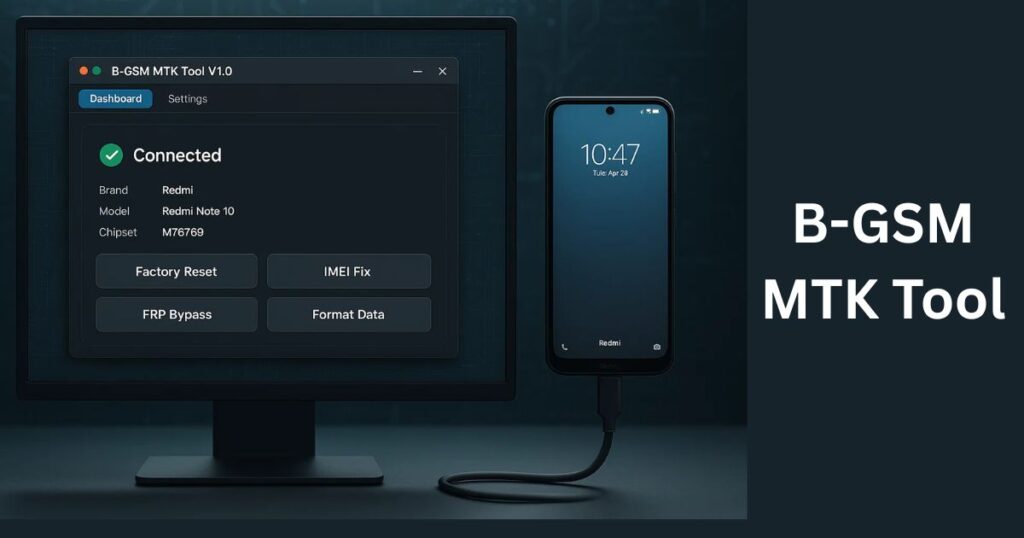
B-GSM MTK Tool V1.0 is a multi-functional software utility designed to provide advanced functions for Redmi devices. Developed by a skilled team of mobile software experts, the tool focuses on repairing, unlocking, formatting, and backing up essential data for Redmi smartphones, especially those using MediaTek (MTK) chipsets.
It simplifies many advanced operations such as factory reset, IMEI repair, bootloader unlocking, FRP removal, and more — all without the need for complex coding or flashing procedures.
Top Features of B-GSM MTK Tool V1.0
Let’s break down the key features that make this tool a favorite among users and mobile repair professionals:
1. Factory Reset
This function allows you to reset your Redmi device to its factory state. All user data, apps, and settings are wiped clean. It’s especially useful before selling the phone or resolving deep software issues.
2. Safe Format for Old Models
A specialized function designed for older models such as Redmi 6, 6A, 7, and 7A. It formats the device without affecting IMEI or network lock, ensuring data cleanup without connectivity loss.
3. FRP (Factory Reset Protection) Bypass
Forgot your Google account credentials? Bought a second-hand device locked by the previous owner? This feature helps remove Google account verification, giving you full access to the phone again.
4. Unlock Bootloader
Unlocking the bootloader opens the door to custom ROMs, kernels, rooting, and other customizations. This tool simplifies the bootloader unlocking process for Redmi MTK devices.
5. Redmi IOA and 9A Bootloader Fix
Some Redmi 9A and IOA models encounter boot issues after unlocking the bootloader, forcing them into Fastboot mode. This tool offers a fix that restores the device to normal mode while retaining the unlocked status.
6. NV Backup & Restore
Backing up NVRAM is crucial, especially for storing IMEI, Wi-Fi, Bluetooth, and network settings. This feature allows easy NV backup and restoration to avoid losing essential configurations.
7. Dual IMEI Fix (Redmi 9A, G, IOA, LOX)
This is a lifesaver for devices that show null or invalid IMEI, making them unusable on mobile networks. With this feature, you can restore valid IMEIs for both SIM slots without affecting the network lock status.
Supported Devices
B-GSM MTK Tool V1.0 is tailored for a broad range of Redmi devices running on MediaTek processors. Here are some popular compatible models:
- Redmi 6 / 6A
- Redmi 7 / 7A
- Redmi 9A
- Redmi IOA (Dandelion)
- Redmi G
- Redmi LOX
As long as your Redmi phone uses an MTK chipset, this tool is likely to support it.
Download B-GSM MTK Tool
Here’s a safe and simple way to download the latest version of the tool:
| Tool Name | Download Link |
|---|---|
| B-GSM MTK Tool | Click Here to Download |
| Telegram Channel for Support | Join Now |
How to Use B-GSM MTK Tool V1.0
Using the tool is relatively simple. However, users must follow the process carefully to avoid any unintended issues.
✅ Steps to Use:
- Download the Tool: First, get the latest version of the B-GSM MTK Tool V1.0 from a trusted source.
- Install Drivers: Ensure your PC has the correct USB and MTK drivers installed.
- Enable USB Debugging: Go to Developer Options on your Redmi device and enable USB debugging.
- Connect the Device: Use a good-quality USB cable to connect the phone to your PC.
- Launch the Tool: Open the tool interface and select the function you want (e.g., FRP Bypass, IMEI Fix).
- Follow On-Screen Instructions: Carefully follow the prompts and wait for the tool to complete the task.
Note: Do not disconnect the phone or power off the PC during any ongoing operation.
Why Choose B-GSM MTK Tool V1.0?
Here are a few reasons why this tool is gaining popularity:
- ✅ User-Friendly Interface: Designed with ease-of-use in mind.
- ✅ No Technical Skills Required: Even beginners can perform complex operations.
- ✅ Regular Updates: New models and features are frequently added.
- ✅ Safe to Use: Keeps user data and device security in mind.
- ✅ Multi-Feature Tool: No need for multiple software — all-in-one solution.
Precautions Before Use
Although the tool is reliable, always follow these precautions:
- Backup your important data before performing operations.
- Always download the tool from trusted sources to avoid malware.
- Do not attempt advanced functions unless you understand their implications.
- Avoid using pirated or cracked versions.
Is B-GSM MTK Tool Free?
Currently, B-GSM MTK Tool V1.0 is being shared among technicians and enthusiasts. Some versions might be free, while others may require registration or a fee. Always verify the source before downloading.
FAQs About B-GSM MTK Tool V1.0
Q1: Is the B-GSM MTK Tool safe to use?
A: Yes, when downloaded from a trusted source and used according to instructions, it’s completely safe.
Q2: Does it work only with Redmi phones?
A: Currently, it is optimized for Redmi devices, especially those with MediaTek chipsets.
Q3: Can I fix IMEI issues using this tool?
A: Yes, the tool includes dedicated features for fixing dual IMEI problems.
Q4: Is internet access required to use the tool?
A: No, once installed, it can work offline. However, downloading drivers or updates may need internet access.
Q5: What if my device gets stuck during the process?
A: Do not panic. Restart your PC and device. If the problem persists, consult the official guide or a technician.
Final Thoughts
B-GSM MTK Tool V1.0 is undoubtedly one of the most powerful and reliable tools for Redmi MTK-based smartphones. With support for a wide range of models and a feature-rich toolkit, it makes device management, repair, and customization much easier.
Whether you’re trying to unlock a bootloader, reset your device, fix IMEI issues, or bypass FRP, this tool offers a convenient and safe way to perform tasks that previously required complex procedures.
For technicians, it can reduce the time and effort required to fix devices. For regular users, it brings advanced features within easy reach.
Disclaimer
This article is for informational purposes only. We do not promote or encourage unauthorized modifications to mobile devices. Always ensure compliance with local laws and manufacturer terms when using third-party tools.