If you’re working with Android smartphones and looking for a powerful, all-in-one mobile servicing tool, the EAGLE GSM Tool V2 could be just what you need. This free utility software is equipped with multiple features for MediaTek (MTK), Qualcomm, Fastboot, and ADB modes. Whether you’re a mobile repair technician or an advanced user, this tool offers essential functionality — all without the need for a paid license.
In this article, we’ll walk you through everything you need to know about EAGLE GSM Tool V2, including its features, how to use it step by step, download instructions, and precautions.
Table of Contents
What is EAGLE GSM Tool V2?
EAGLE GSM Tool V2 is a free Windows-based utility program designed for servicing a wide range of Android devices. It supports MediaTek and Qualcomm chipsets and provides several advanced features like FRP bypass, firmware flashing, bootloader unlocking, and much more.
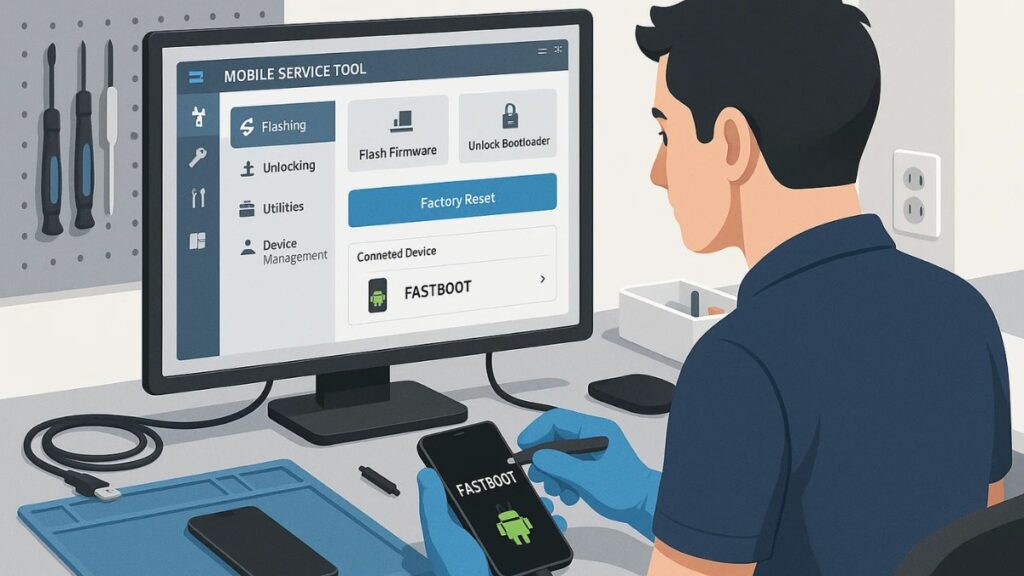
The tool has a clean user interface, supports multiple device modes, and is easy to use even for beginners.
Key Features of EAGLE GSM Tool V2
Here are the main features you’ll find in EAGLE GSM Tool V2:
MediaTek (MTK) Client Functions
- Scatter File Flashing – Flash MTK-based firmware using scatter file.
- Custom Preloader Support – Allows using custom preloaders for better device compatibility.
- Firmware Folder Access – Easily manage and select your firmware folders.
- Erase / Read / Flash Options – Perform core operations with just a few clicks.
Bypass & Wipe Functions (MTK)
- Wipe Userdata
- Erase FRP
- Wipe FRP + MiCloud
- Wipe FRP + User-Data
- Backup & Erase NV
Note: Most bypass features require a custom preloader file for your specific device.
Qualcomm Functions
- Firmware Flashing via Firehose File
- FRP Bypass & Mi Account Removal
- One-Click Options for Common Qualcomm Tasks
ADB Mode Tools
- Firmware Backup and Restore
- App Manager / Debloater for Removing Bloatware
Fastboot Mode Features
- Factory Reset & Info Read
- Erase FRP for UFS & eMMC Devices
- Reboot Functions (EDL/FastbootD/Normal)
- Unlock Bootloader (Multiple Methods)
- Read GPT, Erase, Flash
System Requirements
To run EAGLE GSM Tool V2 on your PC, here’s what you need:
- Operating System: Windows 7, 8, 10, or 11 (64-bit recommended)
- RAM: Minimum 4 GB
- Storage: 20 MB free space (plus space for firmware files)
- Drivers: MTK and Qualcomm drivers should be pre-installed
Download EAGLE GSM Tool V2
Here’s a safe and simple way to download the latest version of the tool:
| Tool Name | Download Link |
|---|---|
| EAGLE GSM TOOL V2.zip | Click Here to Download |
| Telegram Channel for Support | Join Now |
Make sure you download it from a trusted source to avoid corrupted or malware-infected versions.
How to Use EAGLE GSM Tool V2 (Step-by-Step)
Follow these instructions to get started with the tool:
1. Download the Tool
Download the ZIP file containing EAGLE GSM Tool V2 from a trusted website or the official source.
2. Extract the Files
Right-click the ZIP file and select “Extract All”. It’s best to extract it to your Desktop for easy access.
3. Run as Administrator
Inside the extracted folder, locate EAGLE GSM TOOL V2.exe, right-click on it, and choose “Run as Administrator” to launch the program with full system permissions.
4. Connect Your Device
Use a high-quality USB cable to connect your Android device. Make sure USB debugging is enabled if you’re using ADB mode.
5. Choose Your Mode
Depending on your device and task, choose one of the following:
- MTK Mode
- Qualcomm Mode
- ADB Mode
- Fastboot Mode
6. Perform Your Task
Now you can select the function you want to perform — whether it’s FRP bypass, flashing firmware, factory reset, or unlocking bootloader.
Important Precautions
- Always backup your data before using flashing or wipe tools.
- Make sure your device has enough battery (50% or above).
- Use the correct scatter file or firehose file for your device model.
- Avoid interrupting the process once flashing or wiping has started.
- Use official drivers for better compatibility and detection.
Pros and Cons
✔️ Pros:
- Completely free to use
- User-friendly interface
- Wide chipset support (MTK, Qualcomm)
- Multiple bootloader unlock methods
- One-click FRP bypass and Mi account removal
❌ Cons:
- May require custom preloader
- Limited support for newer devices
- No official customer support
Frequently Asked Questions (FAQs)
❓ Is EAGLE GSM Tool V2 safe?
Yes, the tool is safe if downloaded from a trusted source. Avoid downloading cracked or modified versions from unknown websites.
❓ Can I use this tool on Samsung or Xiaomi devices?
Yes, but limited to functions supported under Qualcomm or ADB. For Samsung-specific tasks, consider using Odin.
❓ Does this tool support the latest Android versions?
Support may vary based on chipset and model. Always test carefully or look for updates.
❓ Is it legal to use FRP bypass tools?
Using FRP bypass tools is intended for authorized device access only (e.g., for personal use or with customer permission). Unauthorized use can violate laws and device warranties.
Final Words
EAGLE GSM Tool V2 is a powerful utility software that packs a punch for Android servicing, especially for technicians and DIY users. Whether you’re unlocking bootloaders, bypassing FRP, or flashing firmware, this tool covers most essentials — all for free.
However, always use such tools responsibly, especially when handling personal or customer data. Make backups, follow guides properly, and download only from trusted sources.
Disclaimer:
This article is for educational purposes only. Use tools responsibly and only on devices you own or have permission to service. We are not responsible for any misuse, data loss, or legal issues.