The EasyJTAG Classic update is an essential release for professionals involved in mobile phone repair, data recovery, and device unbricking. Released in June 2025, this version improves the stability, reliability, and overall functionality of the EasyJTAG Classic tool, making it even more effective for advanced memory operations. This article covers everything you need to know about EasyJTAG Classic, including download links, installation tips, and frequently asked questions (FAQs).
Table of Contents
EasyJTAG Classic Key Features
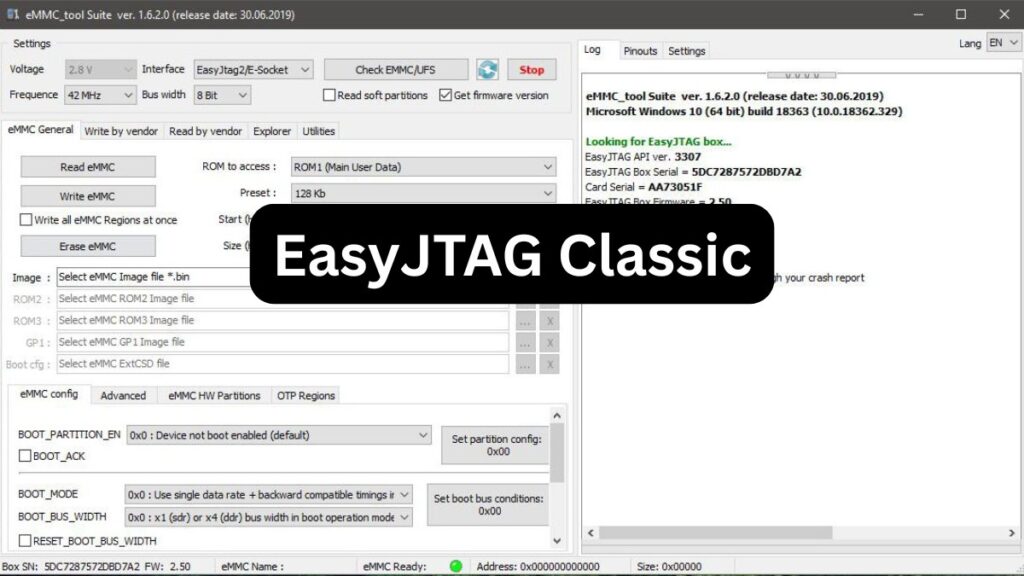
Multi-Protocol Support: Combines functionalities of UFS, JTAG, eMMC, and NAND memory programming, along with a JTAG finder, in a single compact box. easy-jtag.com
Advanced Memory Operations:
- eMMC: Supports reading, programming, recovery, and firmware updates, including dead eMMC flash recovery.
- UFS: Handles UFS2.0 and UFS2.1 flash memory operations.
- NAND: Enables reading and writing for NAND memory, with advanced features for Apple PPN NAND memory.
- SPI: Facilitates SPI memory programming.
Enhanced Software Compatibility
Allows running all Z3X software directly with the box, including Samsung, LG, and other tools, through an integrated smart card interface.
Comprehensive Device Support
Supports a wide range of devices, including the latest Android Samsung phones, LG 3G-Cyon-Show-FOMA phones, HTC, Sony Ericsson, ZTE, HUAWEI, AMOI, and more.
What’s New in EasyJTAG Classic?
- Enhanced overall software stability.
- Minor bug fixes for smoother performance.
- Improved device detection, especially for newer eMMC/UFS chips.
- Faster ISP (In-System Programming) operations.
- Optimized compatibility with Windows 10 and Windows 11.
EasyJTAG Classic v3.8.0.10 Download Links
Here are some reliable sources where you can safely download EasyJTAG Classic v3.8.0.10;
How to Install EasyJTAG Classic
- Download the installer from one of the trusted links provided.
- Extract the ZIP file using WinRAR or 7-Zip.
- Run the Setup.exe file as an administrator.
- Follow the on-screen instructions to complete installation.
- Connect your EasyJTAG Box to your PC and allow driver updates if necessary.
- Activate the software using your Z3X smart card when prompted.
Tips for Best Performance
- Always use the latest firmware for your EasyJTAG Box.
- Keep your Z3X smart card updated.
- Install the software on a clean Windows system to avoid driver conflicts.
- Back up important data before performing memory repairs.
FAQ About: EasyJTAG Classic
Q1. Is EasyJTAG Classic v3.8.0.10 free to download?
Yes, the update is free for existing EasyJTAG users with an activated Z3X smart card.
Q2. Can I use EasyJTAG Classic v3.8.0.10 on any box version?
No, it is designed specifically for EasyJTAG Classic boxes. For Plus or Pro versions, use their respective software suites.
Q3. Does this version support UFS chips?
No, EasyJTAG Classic mainly supports eMMC and NAND memory. UFS support is available with EasyJTAG Plus and Pro boxes.
Q4. I am encountering a driver error. What should I do?
Reinstall the EasyJTAG drivers manually from the ‘Drivers’ folder inside the installation directory.
Q5. Is an internet connection necessary for installation?
Internet is required for license verification and driver downloads. After activation, the software can run offline.
Q6. Will updating erase my previous settings?
No, your settings and device history will remain intact after updating.
Q7. Where can I get technical support?
Visit the Martview Forum or GSMServer for community discussions and official support.
Final Words
EasyJTAG Classic is a must-have update to ensure stable and reliable performance from your EasyJTAG Classic box. By downloading from trusted sources and following best practices, you can maximize the tool’s efficiency and reliability for all your mobile repair needs.
If you experience any issues or require device-specific assistance, don’t hesitate to engage with the community or seek professional support!
Disclaimer: This article is for informational purposes only. Always use genuine software and hardware to avoid damaging your devices.