The MAMALONA Android Utility Tool 2025 is a powerful and free software designed to assist mobile repair technicians and advanced users in managing, troubleshooting, and unlocking various Android devices. It offers a comprehensive suite of tools for bypassing security locks, disabling software updates, and performing factory resets on multiple smartphone brands, including Samsung, Xiaomi, Motorola, Huawei, Nokia, and VIVO.
In this article, we will explore the key features, functionalities, supported brands, installation process, and important considerations when using the MAMALONA Android Utility Tool 2025.
Table of Contents
Key Features of MAMALONA Android Utility Tool 2025
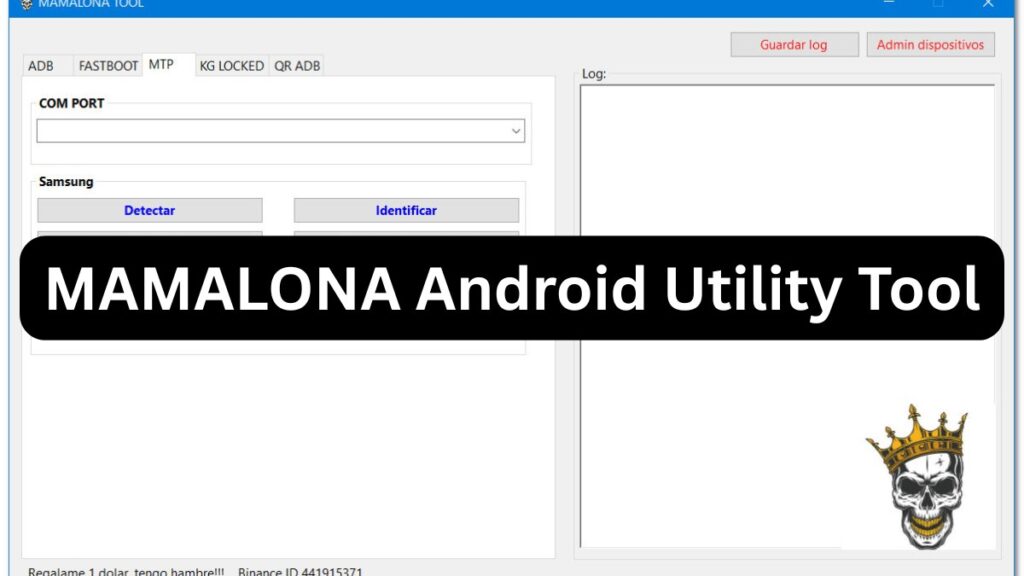
1. ADB Functions
- Read complete device information
- Remove Google FRP (Factory Reset Protection) lock
- Bypass carrier message restrictions
- Install NetPatch tool for better connectivity management
- Remove demo mode from Huawei devices
- Remove MDM (Mobile Device Management) restrictions on Nokia devices
- Disable factory reset protection
- Bypass IT administrator security restrictions
2. Disable Automatic Updates
- Samsung
- TCL/Alcatel
- Huawei/Honor
- VIVO
3. Samsung-Specific Functions
- Bypass KnoxCloud protection
- General Samsung bypass methods
- Factory reset and bootloader functions
4. Xiaomi-Specific Functions
- Disable Mi Account lock
- Turn off software updates
5. Fastboot Functions (Motorola)
- Identify detailed device information
- Repair CommServer issues
- IMEI repair functions
- Full factory reset capabilities
6. MTP (Media Transfer Protocol) Functions for Samsung
- Detect connected Samsung devices
- Enable ADB via multiple methods
- Factory reset functionality
- Generate a QR code for quick ADB access
- Reboot device into download mode
7. KG Locked Functions
- Unlock methods for older Samsung devices
- Remove Knox Cloud, CID Manager, and disable updates
- Install VPN services for network security
- One-click bypass solution
- Fix device relocking issues
8. QR ADB Mode
- Scan QR codes to enable ADB mode quickly and securely
Installation and Usage Guide
Step 1: Download the Software
The MAMALONA Android Utility Tool 2025 can be downloaded from various sources, including repair forums and software repositories. Ensure that you download it from a reliable source to avoid malware or corrupted files.
Step 2: Extract the Files
- Use 7-Zip or WinRAR to extract the compressed file.
- If prompted, enter the password:
2025
Step 3: Run the Software
- If the tool is portable, locate the Mamalona Tool.exe file within the extracted folder.
- Right-click and select Run as Administrator to ensure proper functionality.
Step 4: Utilize the Features
Once the tool is launched, select the appropriate function you need. Follow the on-screen instructions to complete tasks like unlocking devices, bypassing FRP, or disabling updates.
File Password: 2025
Supported Android Brands and Models
The MAMALONA Android Utility Tool 2025 supports a wide range of smartphone brands, including:
- Samsung: Galaxy series, A series, Note series, and more
- Xiaomi: Mi, Redmi, and POCO devices
- Motorola: Various G and Edge series models
- Huawei: Honor and Huawei smartphones
- Nokia: Including models with Android One
- VIVO: Multiple series
- TCL/Alcatel: Select models
Important Considerations
Legal and Ethical Use
The MAMALONA Android Utility Tool 2025 is meant for legitimate troubleshooting and repair purposes. Unauthorized unlocking or bypassing security measures on devices without owner consent may violate local laws and regulations.
Security Concerns
- Ensure your PC has proper antivirus software before installing the tool.
- Use a secondary device to avoid potential risks associated with unauthorized tools.
Backup Your Data
Before using any factory reset or unlocking features, always back up your important files to prevent data loss.
Avoid Unauthorized Modifications
Making changes to system files and security settings can lead to unintended consequences such as device instability, boot loops, or permanent software damage.
Read also: KG Killer Tool V1.1.0 Free – Bypass Knox Guard & MDM Locks
FAQ About MAMALONA Android Utility Tool
1. Is MAMALONA Android Utility Tool 2025 free to use?
Yes, the tool is completely free to use, but always ensure you download it from a trusted source.
2. Does this tool work on all Android devices?
It supports a wide range of Android devices, including Samsung, Xiaomi, Motorola, Huawei, Nokia, and VIVO. However, compatibility may vary based on the model and software version.
3. Is it safe to use this tool?
While the tool is designed for legitimate purposes, using it improperly or from untrusted sources can pose security risks. Always use a secure environment and antivirus software.
4. Can I bypass FRP (Factory Reset Protection) using this tool?
Yes, the tool provides an option to bypass Google FRP locks on supported devices.
5. Do I need an internet connection to use this tool?
Some features require an internet connection, especially those that involve downloading updates or accessing online servers.
6. Will using this tool void my device warranty?
In many cases, using third-party unlocking and bypass tools can void your device’s warranty. Always check with your device manufacturer before proceeding.
7. How can I fix errors while using the tool?
If you encounter errors, try running the tool as an administrator, checking device drivers, and ensuring ADB is enabled on your device.
Read also: KG Fix Tool for Samsung and Android Devices: Unlock MDM
Conclusion
The MAMALONA Android Utility Tool 2025 is a valuable software for mobile repair specialists and advanced Android users who need to manage security locks, bypass FRP, and perform troubleshooting on multiple devices. However, it should be used responsibly and only for ethical purposes.
By following the correct installation process and understanding its features, users can maximize the benefits of this powerful Android tool while minimizing potential risks.
For the latest updates, download links, and troubleshooting tips, always refer to official forums and trusted sources.