In the world of mobile repair, having access to detailed technical schematics and tools is crucial for technicians. Whether you’re diagnosing a hardware issue or performing a component replacement, accurate information can save time and prevent costly mistakes. One such tool that has gained popularity is Phoneboard V1.2.0. This versatile schematic tool supports a wide range of devices, including iPhone, Samsung, Xiaomi, Vivo, and Oppo models.
In this article, we’ll explore the features, benefits, and functionalities of Phoneboard V1.2.0, and how it can assist technicians in their daily repair tasks. We’ll also provide a detailed FAQ section to answer some common queries related to this tool.
Table of Contents
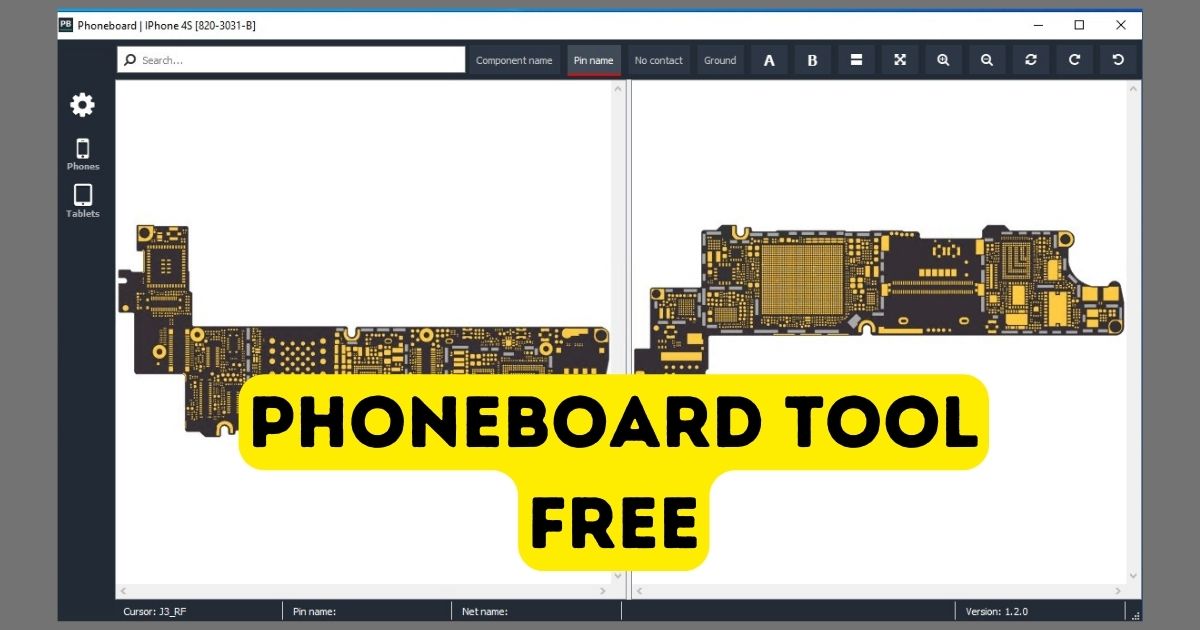
What is Phoneboard ?
Phoneboard V1.2.0 is a schematic tool designed specifically for mobile repair professionals. It provides access to detailed circuit diagrams and layouts of various mobile phone models. With this tool, technicians can easily identify and troubleshoot hardware issues, replace damaged components, and understand the internal workings of a device.
Unlike traditional manuals or paper-based schematics, Phoneboard V1.2.0 offers an interactive and digital approach to schematic diagrams. This makes it easier for technicians to zoom in, access different layers of the board, and even compare circuits across various models.
Key Features of Phoneboard
- Comprehensive Model Coverage: Phoneboard V1.2.0 supports a wide range of mobile phone brands, including:
- iPhone (4S to X Models): Offers schematics for all iPhone models from the iPhone 4S to the iPhone X.
- Samsung: Covers all Samsung models, from the Galaxy S series to the Note series and other devices.
- Xiaomi: Includes detailed schematics for Xiaomi phones across different price ranges, from budget models to flagship devices.
- Vivo: Provides support for various Vivo models, enabling technicians to work on popular devices in the Asian market.
- Oppo: Features schematics for Oppo smartphones, another widely used brand, especially in China and India.
- User-Friendly Interface: Phoneboard V1.2.0 offers a clean and intuitive user interface, making it easy for technicians to navigate through complex diagrams. The tool includes zoom and search features to allow technicians to find specific components or connections quickly.
- High-Resolution Diagrams: The tool provides high-quality, detailed circuit diagrams with color-coded components. This makes it easier for technicians to understand the connections between different parts of the phone’s motherboard.
- Layered Diagrams: Technicians can access multiple layers of the motherboard schematics. This feature is helpful when examining intricate internal circuits, especially when repairing or replacing small components like capacitors, resistors, or IC chips.
- Cross-Platform Compatibility: Phoneboard V1.2.0 works on multiple platforms, ensuring that repair technicians can use the tool across different devices such as Windows PCs, laptops, and even some mobile devices.
- Free and Paid Versions: The tool is available in both free and premium versions. The free version provides access to a limited number of models and basic functionality, while the premium version unlocks a full range of features, including access to advanced schematics and additional device models.
Download Latest Version Phoneboard Schematic Tool
PCB Hardware Schematic Solution and Phoneboard Schematic Completed Schematic are now available! To get the v2.3.0 Phoneboard Schematic Tool, choose any server from the list and download it now using these three buttons below:
Name: Setup_Phoneboard_V1.20
Size: 36 MB
Password: officialroms
Link:
Why Do Mobile Repair Technicians Need Phoneboard ?
The primary challenge for mobile repair technicians is diagnosing and fixing hardware issues quickly and accurately. With the increasing complexity of mobile devices, it’s becoming difficult to rely solely on traditional repair manuals or memory. Here’s why Phoneboard V1.2.0 is a game-changer:
- Instant Access to Schematic Diagrams: No more flipping through thick manuals or browsing online for diagrams. With Phoneboard, technicians can instantly access detailed schematics for various mobile devices, making troubleshooting faster and more efficient.
- Reduced Repair Time: By having an interactive, high-resolution schematic at hand, technicians can quickly identify faulty components or connections. This reduces the time spent diagnosing issues and increases the overall repair efficiency.
- Improved Accuracy: Phoneboard V1.2.0 minimizes the risk of making errors while performing repairs. Technicians can visualize every part of the motherboard, ensuring that they can accurately replace or repair components without causing further damage.
- Wide Model Coverage: Since Phoneboard V1.2.0 supports a broad range of brands, including iPhone, Samsung, Xiaomi, Vivo, and Oppo, it ensures that technicians can service a variety of mobile devices, making them versatile and more capable of handling different repair jobs.
- Enhanced Troubleshooting: For advanced repairs, such as fixing short circuits or diagnosing complex power-related issues, having access to circuit diagrams and connections between components is invaluable. Phoneboard simplifies this process and enables technicians to work more confidently.
The Benefits of Using Phoneboard V1.2.0
- Cost-Effective: Using Phoneboard eliminates the need for expensive physical repair guides and manuals. It’s a one-time investment that offers long-term savings.
- Real-Time Updates: The tool is regularly updated with new models and repair tips, ensuring that technicians are always working with the latest information.
- Portable: With cloud integration, technicians can access Phoneboard from any location, whether they are in the shop or on the go.
Are there any alternatives to Phoneboard V1.2.0?
Yes, there are other schematic tools available, such as iFixit, BoardView, Borneo Schematic Tool and Z3X, but Phoneboard V1.2.0 stands out due to its user-friendly design, extensive device coverage, and detailed repair information.
FAQ about Phoneboard V1.2.0
Is Phoneboard V1.2.0 free to use?
Yes, Phoneboard V1.2.0 offers a free version that provides access to basic schematics for a limited number of models. However, the full version with complete access to all devices and advanced features requires a paid subscription.
Which mobile brands are supported by Phoneboard V1.2.0?
Phoneboard V1.2.0 supports a wide range of mobile brands, including:
iPhone (Models 4S to X)
Samsung (All models)
Xiaomi (All models)
Vivo (All models)
Oppo (All models)
Can I use Phoneboard V1.2.0 on mobile devices?
Phoneboard is primarily designed for use on Windows PCs and laptops. However, it may be compatible with mobile devices through certain apps or cloud-based services.
What is the advantage of using schematic tools like Phoneboard?
Using schematic tools like Phoneboard allows repair technicians to visualize the internal components of mobile devices. This can significantly speed up the repair process and ensure that repairs are done accurately.
Is Phoneboard V1.2.0 suitable for beginners?
Yes, Phoneboard is user-friendly and designed to help both novice and experienced technicians. Its intuitive interface and detailed diagrams make it accessible for beginners, while its advanced features cater to professional repair experts.
Conclusion
Phoneboard V1.2.0 is an essential tool for mobile repair technicians. Its comprehensive schematic coverage for a wide range of devices, coupled with its user-friendly interface, makes it a valuable resource for diagnosing and repairing mobile phones. Whether you’re working on iPhones, Samsung devices, Xiaomi, Vivo, or Oppo models, Phoneboard V1.2.0 offers the information you need to perform repairs with confidence and accuracy. With its easy installation, detailed diagrams, and real-time updates, it’s a must-have tool in any technician’s toolkit.
This article offers a deep dive into Phoneboard V1.2.0, providing both a general overview and answers to common questions that users might have. Would you like any changes or additions to this?