iCloud Hello Screen will not allow your iOS device to proceed? No need to worry! This post will walk you step by step through using a free tool known as the FRPFILE WiFi Windows Tool. It is one of those tools that will help you unlock iCloud Hello Screen on your iOS device. The FRPFILE WiFi Windows Tool is one we can use on all iPhones and iPads running any version of iOS, ranging from iOS 15 up to 17.x. Once done with the bypass, Wi-Fi should never be an issue for you on your iOS device.
Table of Contents
What is the FRPFILE WiFi Windows Tool?
The FRPFILE WiFi Windows tool is totally free software that will unlock the iCloud Hello Screen on your iOS devices starting from iOS 15 up to 17.x. Good solution if you have problems with iCloud Lock and want to use your device once more via Wi-Fi.
Key Features of the Tool
- You can easily bypass the iCloud Hello Screen from iOS 15 to 17.x on devices.
- This software allows you to unlock your device with full support for Wi-Fi when there is no signal.
- Bypass the iCloud Hello Screen with the following iPhone and iPad models:.
Supported iPhone Models
- iPhone SE (requires DCSD cable)
- iPhone 6s & 6s Plus (requires DCSD cable)
- iPhone 7 & 7 Plus
- iPhone 8 & 8 Plus
- iPhone X
Supported iPad Models
- iPad Air 2 (requires DCSD cable)
- iPad Mini 4 (requires DCSD cable)
- iPad 5th and 6th Generation (2017 and 2018 models)
- iPad 7th Generation (2019 model)
- iPad Pro Models (various)
Note: Some models may need a special DCSD cable for the bypass process.
How to Download the Tool
| Name | FRPFILE Wifi Windows Tool |
| Size | 70 MB |
| Owner | ifrpFile |
| Password | frpfile |
| Link | MEGA SERVER |
How to Use the Tool
- Ensure your Device is on iOS 15-17.x: This software is only supported on this version.
- Connect to the Wi-Fi: Your device must be on Wi-Fi.
- Jailbreak Your device: Using iFrpfile, Winra1n, or Palera1n.
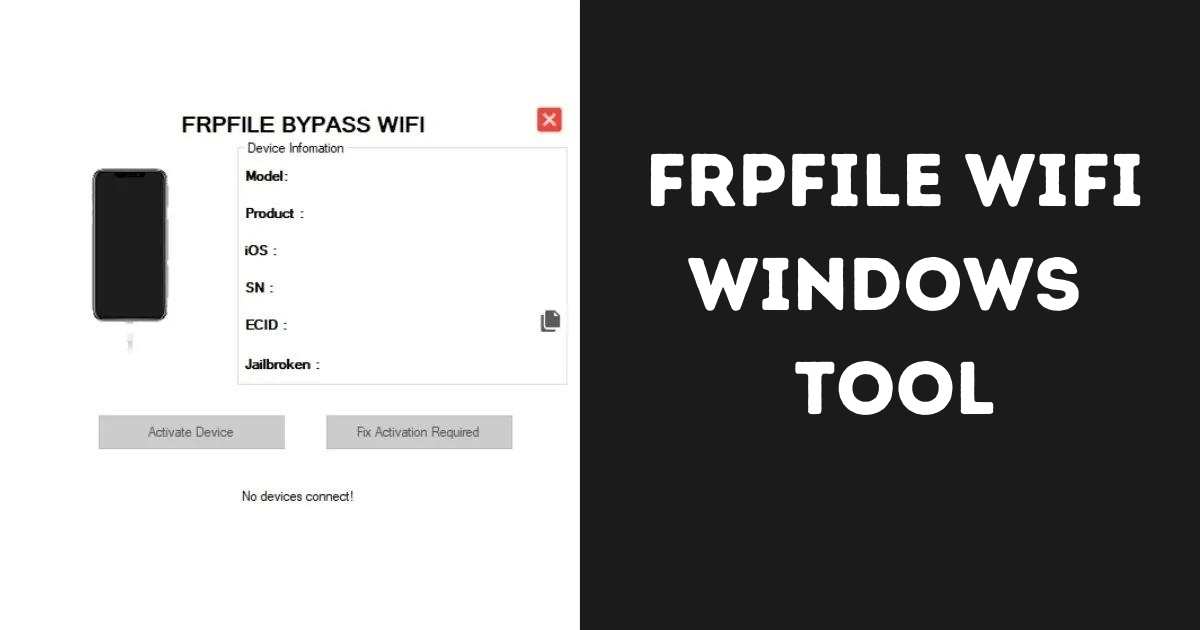
- Open the FRPFILE WiFi Windows Tool by selecting the “Activate Device” button.
- Sign in with Apple ID: Sign in to your iPhone using your Apple ID once you activate it and enjoy FaceTime and other applications.
Troubleshooting Tips
- Bootloop Problem: If your device is boot looping then you may flash your device from 3uTools software and keep all your data.
- Activation Error: If you are facing “Activation Required” error, jailbreak your device once again and click on the “Fix Activation Required” button of this tool.
Conclusion
FRPFILE WiFi Windows tool: a very useful tool in bypassing the Apple iCloud Hello Screen regardless of whether you have an iPhone or iPad. Just ensure you follow instructions correctly, and you are off your way to running with your device quickly!