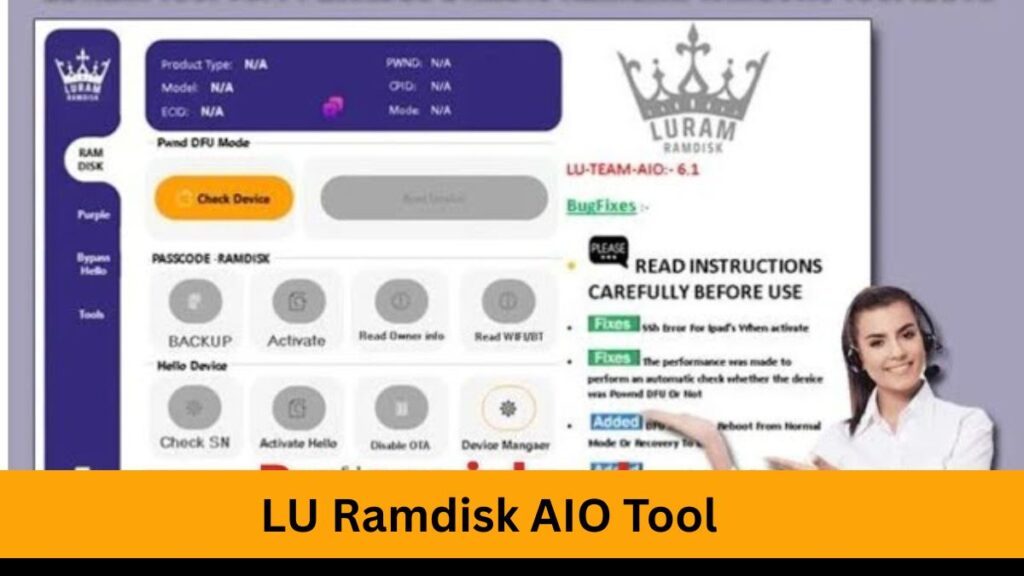
LU-Ramdisk AIO Tool is a powerful and versatile utility designed for iOS device management, particularly in iCloud bypassing, jailbreaking, and device restoration. Built around the capabilities of the checkm8 exploit, this tool is a go-to for technicians and power users dealing with Apple devices—especially iPhones and iPads powered by A7 to A11 chips.
Table of Contents
What is LU Ramdisk AIO?
LU-Ramdisk AIO (All-in-One) is a script-based tool that enables users to create a custom RAMDisk environment using the checkm8 bootrom exploit. A RAMDisk allows the device to boot a temporary, custom operating environment from RAM without touching the system partition, making it a safe and reversible method for:
- iCloud Activation Lock bypass
- Root filesystem access
- File transfer and device customization
- Passcode and MDM bypass (on certain models)
Key Features
✅ iCloud Bypass (A7–A11 Devices)
By loading a custom RAMDisk, users can bypass iCloud Activation Lock for testing or recovery purposes on supported chipsets.
✅ Passcode/MDM Bypass
Some versions of LU-Ramdisk allow for Mobile Device Management (MDM) and passcode removal on supervised devices.
✅ File System Access
Access key file system areas, dump partitions, or recover data without jailbreaking permanently.
✅ Custom Tools Integration
LU-Ramdisk AIO often comes with pre-packaged tools like ipwndfu, irecovery, and sshrd scripts to perform additional actions.
Supported Devices and iOS Versions
| Device Series | Chipset | Supported? |
|---|---|---|
| iPhone 5s | A7 | ✅ |
| iPhone 6/6+ | A8 | ✅ |
| iPhone 6s/6s+ | A9 | ✅ |
| iPhone 7/7+ | A10 | ✅ |
| iPhone 8/X | A11 | ✅ |
System Requirements
- Operating System: macOS, Linux, or Windows (with libusb and Python support)
- Python 3+ installed
- USB Lightning Cable
- Checkm8 support tools like ipwndfu (for macOS/Linux), irecovery, and libusb libraries.
Download LU Ramdisk AIO
| Version | Download Link |
|---|---|
| SERVICES AVAILABLE | server.officialroms.com |
| LU-Ramdisk 7.3 | Download LU-Ramdisk 7.3 |
How to Use LU Ramdisk AIO (General Steps)
Step 1: Put Device in DFU Mode
- Power off your iPhone
- Press and hold Power + Home (or Volume Down for Face ID devices) for 10 seconds
- Release Power but keep holding the other button until the screen goes black and the computer detects it
Step 2: Launch LU-Ramdisk AIO
- Open terminal/command line
- Run the LU-Ramdisk script (e.g.,
python3 ramdisk.pyorbash ramdisk.shdepending on the version)
Step 3: Create and Boot RAMDisk
- The tool will exploit the device using checkm8
- Then it creates a RAMDisk and boots it onto your device
Step 4: Access or Modify the Device
- Use SSH to access your device (usually via
ssh root@localhost -p 2222) - Modify file system, bypass iCloud, or run included tools
Step 5: Restart or Restore
- Restart to remove RAMDisk changes (not permanent)
- Optionally restore the device using iTunes or 3uTools
FAQ About The LU Ramdisk AIO Tool
Is LU-Ramdisk AIO legal to use?
It depends. If you’re using it on a device you own for recovery or research, it’s generally legal. Bypassing iCloud on stolen or locked devices is illegal and unethical.
Can it remove iCloud permanently?
No. LU-Ramdisk AIO creates a temporary environment. For permanent removal, other methods (like server-side unlocking or official Apple support) are needed.
Does it work on iPhone XR or newer?
No. LU-Ramdisk AIO relies on the checkm8 bootrom exploit, which is only available on A7–A11 chipsets.
Is it a jailbreak?
Not exactly. It’s more of a temporary boot to a jailbroken-like state via RAMDisk without writing to NAND. However, it can aid the jailbreak process.
Can I use it on Windows?
Yes, but it’s more complex. macOS and Linux have better support for the tools used (like ipwndfu, libusb). On Windows, you’ll need to install extra drivers and dependencies.
Will it brick my phone?
There’s always a risk, especially if commands are misused. Make sure to follow instructions carefully and use it only on compatible devices.
Do I need SHSH blobs or jailbreak?
Not for basic operations like RAMDisk boot or iCloud bypass testing, but you might need SHSH blobs for other advanced customizations or restores.
Disclaimer
This article is for educational and informational purposes only. LU-Ramdisk AIO should be used only on devices you own or are authorized to modify. Unauthorized use, including iCloud bypass on stolen devices, is illegal and punishable under law.


![iResolvePrime OPEN MENU Free Tool [2025]](https://www.officialroms.com/wp-content/uploads/2025/04/iResolvePrime-OPEN-MENU-Free-Tool-2025-2.jpeg "iResolvePrime OPEN MENU Tool V1.7: Best FMI Off & Backup Utility 2")